Looking for the best laptop under ₹50,000 in India? This is the sweet spot where budget laptops stop feeling like compromises. Prices checked: October 2026. This is our complete guide to the best laptop under 50000 in India for 2026. With Diwali sale prices live right now, you can get 16GB RAM, a 512GB SSD, and even an OLED display without crossing ₹50,000. That combination is exactly what defines the best laptop under 50000 tier in 2026.
After checking the current listings on Amazon.in and Flipkart, this guide shortlists five laptops that are genuinely worth buying at this budget. Prices are written as approximate figures because they shift during sale season, so always confirm the live price on the product page before you buy. Every model here earned its place as a best laptop under 50000 contender on the same tests: display quality, 16GB RAM, SSD speed and after-sales reach.
Best Laptop Under 50000: Quick Comparison
All five best laptop under 50000 picks compared side by side — prices checked during the Diwali sale:
| Product | Best For | Price | Check Price |
|---|---|---|---|
| ASUS Vivobook K15 OLED (Ryzen 5 5500U, 16GB, 512GB) | Best display under ₹50,000 | Around ₹45,590 | Check Price on Flipkart |
| HP 15s (Ryzen 5 5500U, 16GB, 512GB) | All-round value with HP service | Around ₹46,900 | Check Price on Flipkart |
| Acer Aspire Lite (Ryzen 5 5500U, 16GB, 512GB) | Cheapest backlit keyboard pick | Around ₹43,500 | Check Price on Amazon |
| Acer Aspire Lite (Ryzen 5 5500U, 16GB, 1TB) | Maximum storage under ₹50,000 | Around ₹43,000 | Check Price on Amazon |
| HP 15s (i5-1235U, 16GB, 512GB) | Intel pick with 16GB RAM | Around ₹49,500 | Check Price on Amazon |

Best Laptop Under 50000: Detailed Reviews
1. ASUS Vivobook K15 OLED (Ryzen 5 5500U, 16GB RAM, 512GB SSD)
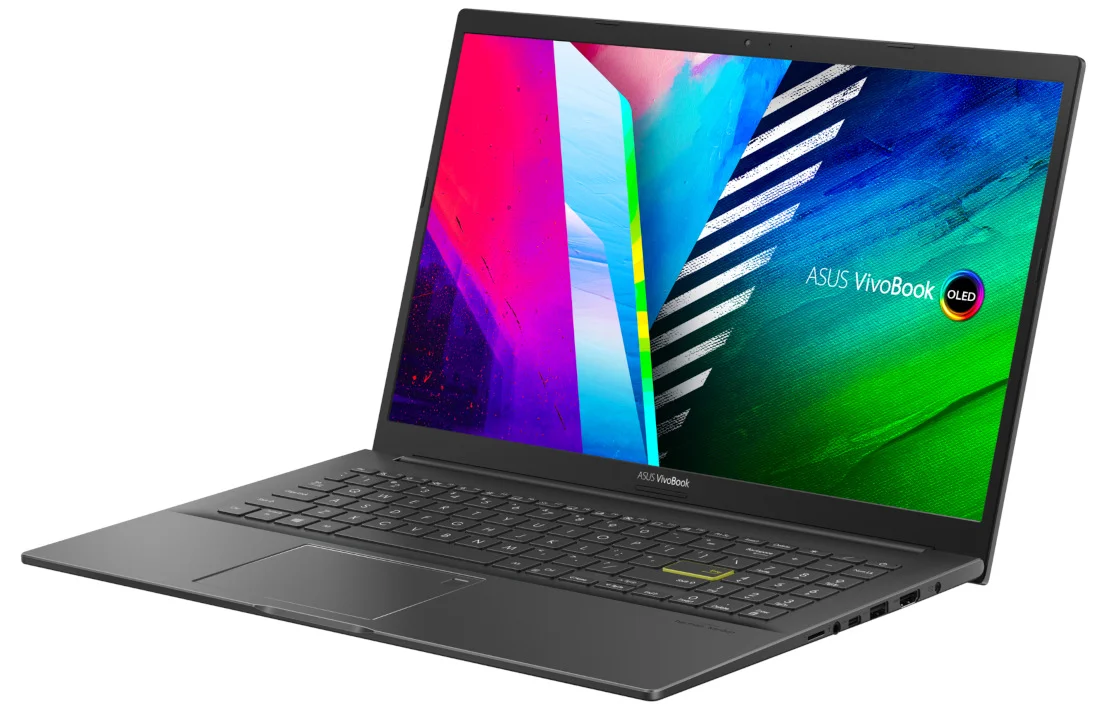
This is the top pick under ₹50,000, and the reason is simple: nothing else at this price gives you an OLED display. The 15.6-inch Full HD OLED panel has the kind of deep blacks and punchy colours that make movies, YouTube, and even everyday browsing look noticeably better than any regular LCD in this budget. Under the hood you still get the dependable Ryzen 5 5500U with 16GB RAM and a 512GB SSD, so performance for work and study is sorted too. It also has a fingerprint sensor for quick logins. The trade-off is weight at 1.8 kg and battery life that is average rather than great.
Key specs:
- AMD Ryzen 5 5500U (6 cores, 12 threads)
- 16GB RAM, 512GB SSD
- 15.6-inch Full HD OLED display
- Fingerprint sensor, Windows 11 Home, 1.8 kg
Pros: OLED display is unmatched at this price; 16GB RAM and 512GB SSD; fingerprint login; solid ASUS build quality.
Cons: 1.8 kg is heavy for daily commuting; battery life is average; OLED can be overkill if you only do documents and spreadsheets.
Who should buy: Anyone who watches a lot of content on their laptop, or who wants the single best screen available under ₹50,000. Check Price on Flipkart
2. HP 15s (Ryzen 5 5500U, 16GB RAM, 512GB SSD)
If you want the safe, no-drama choice, this is it. The HP 15s pairs the same strong Ryzen 5 5500U with 16GB of RAM and a 512GB SSD, which is exactly the combination to look for at this budget. You lose the OLED screen of the ASUS, but you gain HP’s far wider service network across India, which matters a lot if you live outside a metro. The anti-glare Full HD display is easy on the eyes for long work sessions. It is a plain-looking machine, but everything about it is dependable: keyboard, thermals, battery, and after-sales support.
Key specs:
- AMD Ryzen 5 5500U (6 cores, 12 threads)
- 16GB DDR4 RAM, 512GB SSD
- 15.6-inch Full HD anti-glare display
- Windows 11 Home, 1.69 kg
Pros: 16GB RAM plus strong Ryzen 5 performance; HP’s service network is the best in India; anti-glare screen; frequently discounted in sales.
Cons: Regular LCD, not OLED; basic design; no backlit keyboard on most listings; 1.69 kg.
Who should buy: Buyers who want maximum reliability and easy service access, and who value peace of mind over a fancy display. Check Price on Flipkart
3. Acer Aspire Lite AL15-41 (Ryzen 5 5500U, 16GB RAM, 512GB SSD)
The AL15-41 variant of the Aspire Lite stands out for one small but daily-useful feature: a backlit keyboard. If you work late at night in a hostel room or a dim bedroom, you will appreciate this more than any benchmark number. The rest of the package is familiar: Ryzen 5 5500U, 16GB RAM, 512GB SSD, and a 15.6-inch Full HD anti-glare display at 1.59 to 1.6 kg. It is also usually the cheapest 16GB option on this list during sales. Acer’s service reach is the main thing to verify in your city before ordering.
Key specs:
- AMD Ryzen 5 5500U (6 cores, 12 threads)
- 16GB DDR4 RAM, 512GB SSD
- 15.6-inch Full HD anti-glare display
- Backlit keyboard, Windows 11 Home, around 1.6 kg
Pros: Backlit keyboard at this price is rare; usually the cheapest 16GB pick; light enough for daily carry; strong all-round specs.
Cons: Smaller service network than HP, Dell, or Lenovo; average display colours; plastic build.
Who should buy: Night owls and hostel students who want a backlit keyboard and 16GB RAM at the lowest possible price. Check Price on Amazon
4. Acer Aspire Lite (Ryzen 5 5500U, 16GB RAM, 1TB SSD)
Running out of storage is one of the most annoying laptop problems, and this variant solves it with a full 1TB SSD. That is double the storage of every other pick here, enough for years of project files, downloaded courses, movies, and even a small photo library, with room to spare. You get the same Ryzen 5 5500U and 16GB RAM, so performance is identical to the other Acer. If your work involves large files, video lectures saved offline, or you simply never want to think about disk space, this is the one.
Key specs:
- AMD Ryzen 5 5500U (6 cores, 12 threads)
- 16GB DDR4 RAM, 1TB SSD
- 15.6-inch Full HD anti-glare display
- Windows 11 Home, 1.59 kg
Pros: 1TB SSD at this price is exceptional value; same strong CPU and 16GB RAM; light chassis.
Cons: Same Acer service-network caveat; no backlit keyboard on this variant; display is functional rather than impressive.
Who should buy: Students and creators who store a lot locally and want to stop worrying about disk space for years. Check Price on Amazon
5. HP 15s (Intel Core i5-1235U, 16GB RAM, 512GB SSD)
For buyers who specifically want Intel, this HP 15s pairs the 12th-gen i5-1235U with 16GB RAM and a 512GB SSD. The 1235U is a 10-core chip that feels quick in everyday use: fast app launches, smooth browsing, and decent efficiency. It does not match the Ryzen 5 5500U in sustained multi-core workloads, so pick this for the Intel preference or if a sale drops it below the AMD models, not for extra performance. You still get HP’s service network, a backlit keyboard on most listings, and an anti-glare Full HD display.
Key specs:
- Intel Core i5-1235U (10 cores, 12 threads)
- 16GB DDR4 RAM, 512GB SSD
- 15.6-inch Full HD anti-glare display
- Backlit keyboard on most listings, Windows 11 Home, 1.69 kg
Pros: 16GB RAM with an Intel chip; snappy everyday performance; HP service network; backlit keyboard.
Cons: Weaker than Ryzen 5 5500U in heavy multitasking; usually priced a little higher than the AMD equivalent; sits close to the ₹50,000 ceiling.
Who should buy: Intel loyalists, or anyone who finds this variant cheaper than the Ryzen models during a sale. Check Price on Amazon

Buying Guide: What Matters in a Laptop Under ₹50,000
16GB RAM should be your baseline. The single biggest difference between a ₹40,000 laptop and a ₹50,000 laptop is RAM. At this budget there is no excuse for 8GB. With 16GB you can keep dozens of tabs open, run Office alongside Zoom, and still have headroom. Every pick on this list has 16GB. Treat that as the entry ticket for any best laptop under 50000 in 2026.
Processor: Ryzen 5 5500U vs Intel i5-1235U. Both are competent, but the Ryzen 5 5500U generally wins on multi-core performance and efficiency at this price. The i5-1235U is no slouch for everyday tasks. Either is fine; choose based on the overall deal rather than the chip alone. Neither chip is a wrong answer at this level; the best laptop under 50000 is simply the one that pairs either of them with 16GB RAM and a good display.
SSD: 512GB minimum, 1TB if you store a lot. A fast NVMe SSD is standard here. 512GB suits most users. If you keep movies, offline courses, or project archives locally, the 1TB Acer variant above is worth the same money.
Display is where you can upgrade your experience. The ASUS Vivobook K15 OLED on this list proves you do not need ₹70,000 for a great screen. If you watch content daily, prioritise the display. For pure document work, any Full HD anti-glare panel is fine.
Battery, weight, and thermals. Expect 6 to 8 hours of real-world battery at this budget. Keep weight under 1.8 kg if you commute with it. Ryzen 5000-series chips run cool and quiet, which is one reason they dominate this price band.
Keyboard and ports. A backlit keyboard is genuinely useful and appears on some picks here. Check for at least two USB-A ports, one USB-C, and an HDMI port so you do not need dongles for projectors and external displays.
Warranty and where to buy. Stick to Amazon.in and Flipkart sellers with high ratings, or the brand’s own store. Register the warranty on day one. Diwali and year-end sales bring the best prices; the figures in this article were checked in October 2026.
OLED vs regular LCD. Only one pick here has an OLED screen, and it changes the experience more than any spec bump. If you watch lectures, movies, or YouTube for hours daily, the ASUS Vivobook K15 OLED is worth prioritising. If your laptop is purely a work machine, save the money and take the HP.
Should you stretch to ₹55,000? Only for a clearly better chip (like a Ryzen 7 or 13th-gen i5 with 16GB) during a sale. Do not stretch just for a bigger brand name on the same specs. The performance jump from ₹50,000 to ₹55,000 is much smaller than the jump from ₹40,000 to ₹50,000.
Student discounts and exchange offers. HP, Lenovo, ASUS, and Acer all run student stores with 5-10% education pricing. Exchange offers on Flipkart and Amazon can knock off another ₹5,000-10,000 if you have an old working laptop. Stack a student discount with a sale and you occasionally beat the street price by a wide margin.
Also check: Best Laptop Under ₹40,000 for Students
Our verdict: The ASUS Vivobook K15 OLED is the best laptop under 50000 for most buyers this Diwali — the OLED display alone separates it from the pack. If storage matters more, the 1TB Acer Aspire Lite is the other best laptop under 50000 worth your money.
Frequently Asked Questions
What are the best laptop under 50000 in 2026?
Our complete list above covers the best laptop under 50000, with full specifications, prices, pros and cons for every model — plus a detailed buying guide to help you pick the right one for your budget.
Is it worth spending ₹50,000 instead of ₹40,000 on a laptop?
In most cases, yes. The extra ₹10,000 usually buys you 16GB RAM instead of 8GB, and that alone extends the laptop’s useful life by a year or two. If your budget is strict, a ₹40,000 Ryzen 5 laptop is still very capable. But the best laptop under 50000 models age slower, thanks to the extra RAM and better displays.
Which is better at this price: HP, ASUS, Acer, or Lenovo?
For displays, ASUS leads with the OLED pick. For service network, HP wins. For raw value per rupee, Acer is hard to beat. Lenovo’s best options sit slightly above ₹50,000 right now. Pick by what matters most to you. That priority test is honestly the fastest way to find your own best laptop under 50000.
Can these laptops handle video editing?
Light editing in tools like CapCut or Premiere Rush is fine, especially with 16GB RAM. Heavy 4K timelines will struggle on integrated graphics regardless of brand. For serious editing, you need a laptop with a dedicated GPU, which starts well above this budget. For everything short of that, a best laptop under 50000 with 16GB RAM is genuinely capable. Working with a tighter budget instead? Our ₹40,000 laptop guide picks the best student machines below this tier.
Do these laptops come with MS Office?
Some listings bundle MS Office Home, especially Dell and HP models. Most ASUS and Acer listings do not. Check the product page carefully, because sellers sometimes show Office as included when it is only a trial.
Should I buy extended warranty?
A 1-year standard warranty is included. Extended warranty (2-3 years) costs around ₹2,000-3,000 and is worth it if you plan to keep the laptop for 4+ years or live far from a service centre.
Do I need a dedicated graphics card?
Not at this budget, and not for the uses these laptops target. Integrated graphics on the Ryzen 5 and i5 handle study, office work, content watching, and light creative tools. A dedicated GPU only appears in gaming laptops starting around ₹60,000+, which is a different buying decision entirely.
How long will a ₹50,000 laptop last?
With 16GB RAM and an SSD, realistically 4-5 years for study and office work. The battery is usually the first thing to age; most brands sell replacement batteries for ₹3,000-5,000 when the time comes. Keep the vents dust-free and you will get the full life out of it.
Should I buy extended warranty from Flipkart/Amazon or the brand?
Brand warranty extensions (bought from HP, Dell, Lenovo, or ASUS directly) are more reliable than marketplace “protection plans” sold by third parties. If you want extra coverage, extend through the brand’s website within the first year; it usually costs ₹2,000-4,000 for two more years.
When is the best time to buy a laptop in India?
Diwali sales (October-November) consistently have the lowest prices, followed by Republic Day and back-to-college sales. Avoid buying in March-April when old stock sells at higher prices before new models arrive.
Disclosure: This post contains affiliate links. If you buy through them, we may earn a commission at no extra cost to you. Take a few minutes to read our in-depth Common Social Media Mistakes coverage. We answer the most common questions about How to Start a Blog in this guide.