Looking for the best tablet under ₹20,000 in India? In 2026 this budget buys you a genuinely good tablet — sharp 11-inch displays, 90Hz or 120Hz refresh rates, big batteries, and even stylus support on some models. Whether it’s for online classes, OTT binges, office documents, or the kids, this guide compares six of the most popular tablets from Redmi, Samsung, Realme, Lenovo, and OnePlus. Prices checked: October 2026. This is our complete guide to the best tablet under 20000 in India for 2026. With Diwali sales live, these prices are likely to drop further — check the live price before you buy.
Best Tablet Under 20000: Tablets Under ₹20,000: Quick Compare
| Product | Best For | Price | Check Price |
|---|---|---|---|
| Redmi Pad 2 | Best overall (2.5K display) | around ₹17,999 | Check Price on Amazon |
| Samsung Galaxy Tab A9+ | Brand trust + updates | around ₹18,999 | Check Price on Amazon |
| Realme Pad 2 | Best value 120Hz display | around ₹14,799 | Check Price on Flipkart |
| Lenovo Tab M11 | Stylus included in box | around ₹15,999 | Check Price on Flipkart |
| Redmi Pad SE | Cheapest 11-inch pick | around ₹12,999 | Check Price on Amazon |
| OnePlus Pad Go | Most premium feel | around ₹19,999 | Check Price on Amazon |
Best Tablet Under 20000: Screen, Speed, Battery: Tablets Tested
1. Redmi Pad 2 — Best Overall
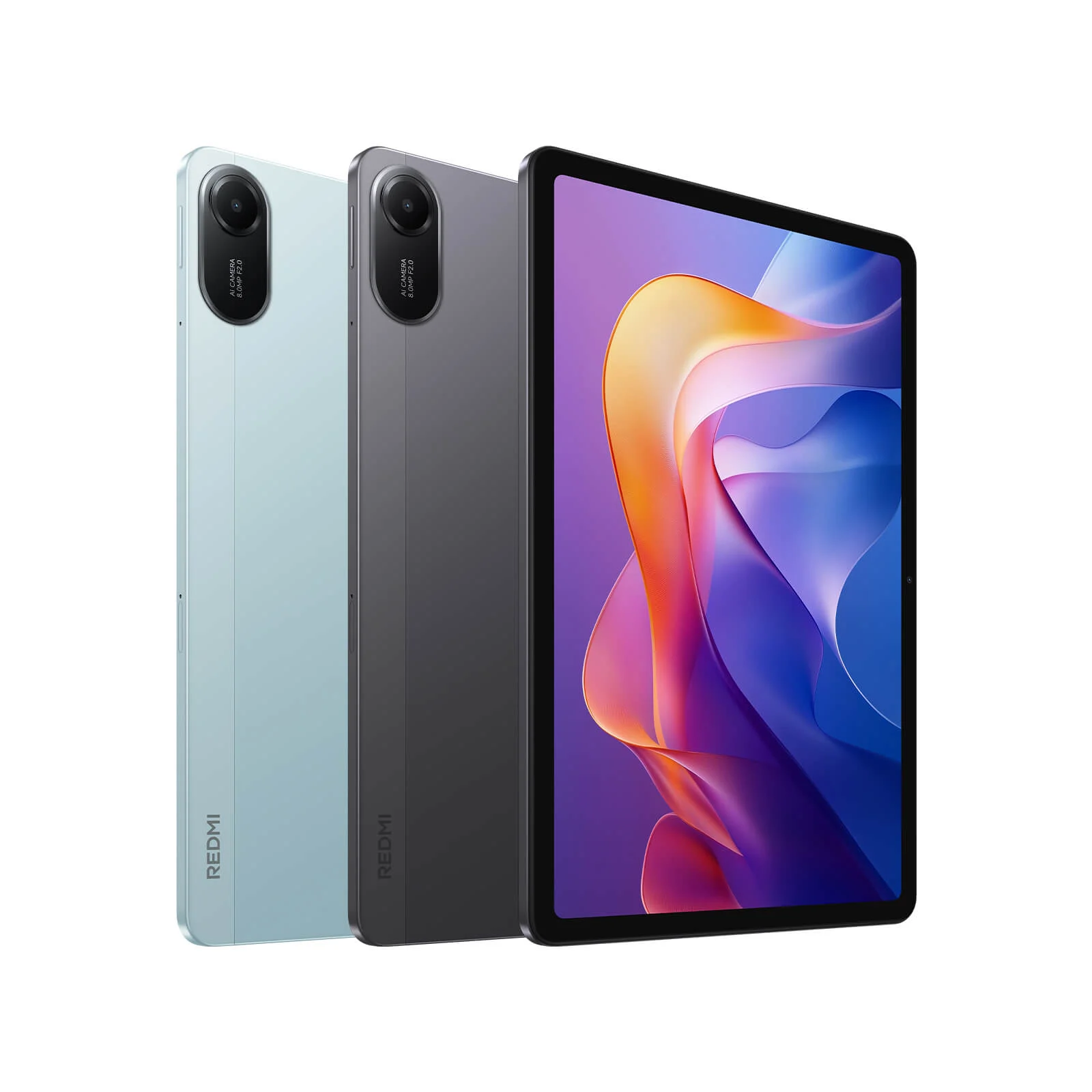
The Redmi Pad 2 is the most well-rounded tablet under ₹20,000 right now. The 11-inch 2.5K display is noticeably sharper than the 1080p-class screens on cheaper rivals, the 9,000mAh battery genuinely lasts through a full day of classes and streaming, and it supports Xiaomi’s Active Pen for note-taking. HyperOS 2 feels smooth and the WiFi + Cellular variant means you aren’t hunting for hotspots. If you buy one tablet from this list blind, make it this one. In everyday use, the 2.5K panel is the standout — text in PDFs and e-books looks pin-sharp, and split-screen multitasking actually feels usable. The 9,000mAh battery comfortably survives a full day of classes plus evening streaming. HyperOS 2’s tablet features, like floating windows and drag-and-drop between apps, are genuinely useful for study workflows. Performance is smooth for everything short of heavy gaming.
Key specs: – 11-inch 2.5K display (27.94 cm) – 9,000mAh battery for all-day use – HyperOS 2 with AI features – Active Pen (stylus) support – Quad speakers with Dolby Atmos – WiFi + Cellular variants available
Pros: – Sharpest display in this price band – Biggest battery on this list – Stylus support is great for students
Cons: – Top of the budget — leaves little room for accessories – Active Pen sold separately
Who should buy: Students and professionals who want the best screen and battery, and plan to take notes or read a lot.
2. Samsung Galaxy Tab A9+ — Brand Trust + Updates
Samsung is the safe choice in tablets, and the Tab A9+ is why. You get an 11-inch 90Hz display, the reliable Snapdragon 695, and — most importantly — Samsung’s software update promise, which budget Chinese brands rarely match. DeX-style multitasking, Kids Mode, and seamless pairing with Samsung phones make it the best pick for families already in the Samsung ecosystem. Performance won’t thrill gamers, but for study, streaming, and video calls it is rock solid. Samsung’s real advantage shows up over time. While budget tablets often stall on old Android versions, the A9+ keeps receiving security and feature updates — important if kids will use it for years. Samsung Kids mode, with its safe sandboxed environment, is the best parental-control setup at this price. DeX-style desktop multitasking also makes it the most laptop-like tablet here for document work.
Key specs: – 11-inch display with 90Hz refresh rate – Snapdragon 695, 8GB RAM – 7,040mAh battery with fast charging – Quad speakers – Samsung’s multi-year software update support – Expandable storage via microSD
Pros: – Most reliable software updates in this segment – Great for Samsung phone owners (ecosystem features) – Expandable storage keeps it future-proof
Cons: – TFT display, not as punchy as rivals’ IPS panels – Snapdragon 695 is showing its age for gaming
Who should buy: Families and Samsung phone users who value long-term updates and hassle-free ownership over raw specs.
3. Realme Pad 2 — Best Value 120Hz Display
The Realme Pad 2 remains the value king: an 11.5-inch 120Hz display and Helio G99 chipset at a price that often dips under ₹15,000. Scrolling and multitasking feel buttery, the 8,360mAh battery with 33W fast charging refuels quickly, and the 4G LTE variant doubles as a calling tablet — handy for attending online seminars without WiFi. For the money, no other tablet here gives you this much screen smoothness.
Key specs: – 11.5-inch IPS display, 120Hz refresh rate – MediaTek Helio G99, 6GB RAM – 8,360mAh battery, 33W fast charging – 4G LTE + voice calling support (cellular variant) – Quad speakers – Split-screen multitasking
Pros: – 120Hz display at the lowest price on this list – Strong performance from Helio G99 – Calling-tablet variant adds real utility
Cons: – Software update track record is average – Slightly heavy at 518g
Who should buy: Students and streamers who want the smoothest display and best specs-per-rupee, especially with the LTE variant for on-the-go use. The 120Hz display transforms everyday use — scrolling through notes, web pages, and feeds feels flagship-smooth. The Helio G99 handles BGMI at balanced settings without major stutters, and 33W charging means a quick top-up before heading out. The LTE variant’s calling support is underrated: it works as a backup device for OTPs and calls when your main phone is charging.
4. Lenovo Tab M11 — Stylus Included in the Box
Lenovo does something clever with the Tab M11: it bundles the pen in the box. While rivals charge extra for a stylus, here you can start taking handwritten notes on day one — a genuine advantage for students. The 10.95-inch FHD 90Hz display is crisp, the Helio G88 handles everyday tasks fine, and quad speakers with Dolby Atmos make it a solid movie machine. It’s the most student-ready package under ₹16,000.
Key specs: – 10.95-inch FHD IPS display, 90Hz – MediaTek Helio G88, 8GB RAM – Lenovo Tab Pen included in the box – 7,040mAh battery with fast charging – Quad speakers with Dolby Atmos – 13MP rear + 8MP front cameras
Pros: – Stylus included — no extra ₹2,000–3,000 accessory cost – Good cameras for video calls and document scanning – Clean, near-stock Android experience
Cons: – Helio G88 is the weakest chip on this list – No cellular variant at this price
Who should buy: Students who want to take handwritten notes immediately, without buying accessories separately. The bundled pen changes the value equation. A decent active stylus costs ₹2,000–3,000 on its own, so the M11 effectively undercuts rivals by that much for note-takers. Lenovo’s note app is simple but effective, and palm rejection works well enough for lecture notes. The near-stock Android interface stays out of your way, and the 8MP front camera is noticeably better than most budget tablets for video calls.
5. Redmi Pad SE — Cheapest 11-Inch Pick
If ₹13,000 is your ceiling, the Redmi Pad SE is the tablet to get. You still get a big 11-inch 90Hz display, an 8,000mAh battery, and quad speakers — the core big-screen experience — for roughly the price of a budget phone. The Snapdragon 680 is modest and the 4GB RAM needs light multitasking, but for YouTube, OTT apps, e-books, and kids’ learning apps, it’s more than enough. Easily the best screen-per-rupee here.
Key specs: – 11-inch display, 90Hz refresh rate – Snapdragon 680 processor – 8,000mAh battery – Quad speakers with Dolby Atmos – 8MP rear + 5MP front cameras – Lightweight metal unibody design
Pros: – Lowest price for a proper 11-inch tablet – Big battery and good speakers for media – Premium-feeling metal build
Cons: – Modest performance — not for gaming or heavy multitasking – Base variant has just 4GB RAM
Who should buy: Budget buyers, parents buying for kids’ online classes, and anyone who mainly streams video. For media consumption, the SE punches well above its price. The 11-inch panel is big enough for comfortable movie watching, the quad speakers are loud and clear, and the 8,000mAh battery stretches across long binge sessions. Kids’ learning apps, YouTube, and e-books all run fine. Just keep multitasking light — with 4GB RAM, it is happiest running one or two apps at a time.
6. OnePlus Pad Go — Most Premium Feel
The OnePlus Pad Go feels like it belongs in a higher price bracket. The 11.35-inch 2.4K display is gorgeous, the Helio G99 keeps everything smooth, and OxygenOS-for-tablets is the cleanest software experience on this list. At ₹19,999 it kisses the budget ceiling, but you get flagship-adjacent design, an 8,000mAh battery, and excellent cellular connectivity options. It’s the “treat yourself” pick.
Key specs: – 11.35-inch 2.4K IPS display, 90Hz – MediaTek Helio G99, 8GB RAM – 8,000mAh battery with 33W SuperVOOC charging – Quad speakers with Dolby Atmos – Slim, premium unibody design – LTE variant available
Pros: – Best display quality and design on this list – Clean, fast software with good multitasking – Fast 33W charging
Cons: – Most expensive pick — leaves no budget headroom – No stylus bundled
Who should buy: Buyers who want the most premium tablet experience possible without crossing ₹20,000. OxygenOS is the cleanest software here — no bloatware, sensible multitasking, and thoughtful touches like an open-canvas split-screen mode. The 2.4K display has excellent colour calibration for the price, making it great for photo editing and design apps. Build quality feels a tier above: slim bezels, a premium finish, and a design that does not look out of place next to tablets costing twice as much.
Which One Should You Buy?
The Redmi Pad 2 is the best all-rounder — sharpest screen, biggest battery, stylus support. Students on a budget should look at the Lenovo Tab M11, which includes the pen in the box and costs less. And if you want Samsung’s updates and ecosystem peace of mind, the Galaxy Tab A9+ is the safe long-term pick.
Tablet Buying: Beyond the Price Tag: What Matters Under ₹20,000
Display. Size and sharpness matter most. All six here are 11 inches or larger. Prefer 2.5K/2.4K panels (Redmi Pad 2, OnePlus Pad Go) for reading and notes; 120Hz (Realme Pad 2) for smoothness. Avoid anything below FHD resolution at this budget.
Chipset and RAM. Helio G99 (Realme Pad 2, OnePlus Pad Go) is the performance sweet spot for gaming and multitasking. Snapdragon 695 (Tab A9+) and G88 (Tab M11) handle everyday use fine. Get 6GB RAM or more — 4GB models (base Redmi Pad SE) are only for light use.
Battery. 8,000mAh+ is the comfort zone for a full day of classes or travel. Also check charging speed: 33W (Realme, OnePlus) refuels far faster than basic 10W charging.
Stylus support. Only matters if you’ll take handwritten notes. The Lenovo Tab M11 includes the pen in the box; the Redmi Pad 2 supports one but sells it separately. Don’t pay extra for a stylus you’ll never use.
Best Tablet Under 20000: More Answers Before You Buy
How do I choose the best tablet under 20000 for my needs?
Start with your primary use. For classes and note-taking, pick the best tablet under 20000 with stylus support, like the Lenovo Tab M11. For movies and gaming, prioritise a 120Hz display and a strong chipset — the Realme Pad 2 is the best tablet under 20000 for that mix of price and performance.
Is the best tablet under 20000 good enough for office work?
Yes. Every pick above handles documents, spreadsheets, video calls, and email comfortably. If you multitask heavily, choose the best tablet under 20000 with at least 8GB of RAM, such as the Samsung Galaxy Tab A9+ or the OnePlus Pad Go.
Where can I find the lowest price on the best tablet under 20000?
Prices move during sale events, so check the live-price buttons above and compare them with Amazon’s latest tablet offers before you buy. The best tablet under 20000 often drops by ₹1,000–2,000 during Diwali and Big Billion Days.
Should I wait for a sale to buy the best tablet under 20000?
If the purchase is not urgent, waiting for Diwali or Republic Day sales is smart — the best tablet under 20000 you want could get a bank discount or exchange bonus. But the models ranked above as the best tablet under 20000 already offer excellent value at today’s prices.
Do I need the LTE version of the best tablet under 20000?
Only if you use the tablet regularly outside WiFi range. LTE variants of the best tablet under 20000 cost about ₹1,500–3,000 more, so for home, classroom, or office use, the WiFi model of the best tablet under 20000 is the smarter buy.
LTE vs WiFi. Cellular variants cost ₹1,500–3,000 more but free you from hotspots — worth it for students attending classes on the move or for use as a secondary calling device. If the tablet mostly stays home, save the money and get WiFi-only.
Software updates. Samsung leads here by a clear margin. If you plan to use the tablet for 3+ years, that matters more than a slightly faster chip today.
Speakers and cameras. You will use speakers far more than cameras on a tablet. Quad speakers (every pick here has them) make a real difference for classes and movies. Front camera quality matters for video calls — the Lenovo Tab M11’s 8MP front camera leads here. Rear cameras are an afterthought on all budget tablets; do not let megapixels sway you.
Also check: Best 5G Phones Under ₹20,000
Frequently Asked Questions
What are the best tablet under 20000 in 2026?
Our complete list above covers the best tablet under 20000, with full specifications, prices, pros and cons for every model — plus a detailed buying guide to help you pick the right one for your budget.
Which is the best tablet under ₹20,000 in India in 2026? The Redmi Pad 2 is the best all-rounder with its 2.5K display, 9,000mAh battery, and stylus support. For Samsung’s reliability and updates, pick the Galaxy Tab A9+; for maximum value, the Realme Pad 2.
Which tablet is best for students and online classes? The Lenovo Tab M11 (pen included in the box) and Redmi Pad 2 (stylus support, huge battery) are the top student picks. Both handle Google Classroom, PDFs, and note-taking apps comfortably.
Should I buy a WiFi or LTE tablet? Buy LTE if you’ll use the tablet outside home/college WiFi regularly — for travel, commutes, or as a backup calling device. For home use with broadband, WiFi-only saves money for the same performance.
Can these tablets run BGMI or heavy games? The Helio G99 tablets (Realme Pad 2, OnePlus Pad Go) handle BGMI and COD Mobile at medium settings well. The Snapdragon 680/695 and Helio G88 models are better suited to casual games.
What warranty do tablets carry in India? All brands here offer a 1-year manufacturer warranty. Samsung, Lenovo, and Xiaomi have the widest service networks; buy from Amazon or Flipkart directly for smooth claims.
Is Diwali a good time to buy a tablet? Yes — tablets see some of their deepest discounts during the Great Indian Festival and Big Billion Days sales, often ₹2,000–4,000 off plus bank offers. Prices in this guide were checked in October 2026, right before the sale peak.
Disclosure: This post contains affiliate links. If you buy through them, we may earn a commission at no extra cost to you.
You can read the full story on Common Social Media Mistakes in our dedicated post. We have put together a clear explainer on How to Start a Blog — do check it out.