Got an SMS saying a traffic challan was issued against your vehicle, but you have no idea what it’s for? You’re not alone. Every day, thousands of Indian drivers get e-challans from speed cameras and traffic police — and most of them don’t know how to check the e challan status online, let alone pay or dispute it. The good news? The entire process takes less than 5 minutes on the government’s Parivahan portal. This guide walks you through every step: checking your e challan status, paying it online or offline, disputing a wrong challan, and the latest traffic fine rates for 2026.
What is E-Challan and How Does It Work?
An e-challan is a digital traffic fine issued by the traffic police when you violate a road rule. Unlike the old paper challans, e-challans are generated electronically — either on the spot by a traffic officer using a handheld device, or automatically by CCTV and speed cameras installed across cities.
Here’s how the system works: when a camera catches your vehicle jumping a red light or overspeeding, the system reads your number plate, matches it with the vehicle registration database, and an e-challan is issued against your vehicle number. You then receive an SMS on your registered mobile number with the challan details.
The e-challan system was launched by the Ministry of Road Transport and Highways to bring transparency to traffic enforcement. No more arguments with officers on the road, no more lost paper receipts — everything is recorded digitally on the Parivahan e-challan portal. You can check your e challan status, view the violation photo evidence, pay the fine online, or raise a dispute — all from your phone.
How to Check E Challan Status Online (2026)
Checking your e challan status online is simple. The government portal offers three ways to look up pending challans. Pick whichever is easiest for you — all three show the same results.
Method 1: Check by Challan Number
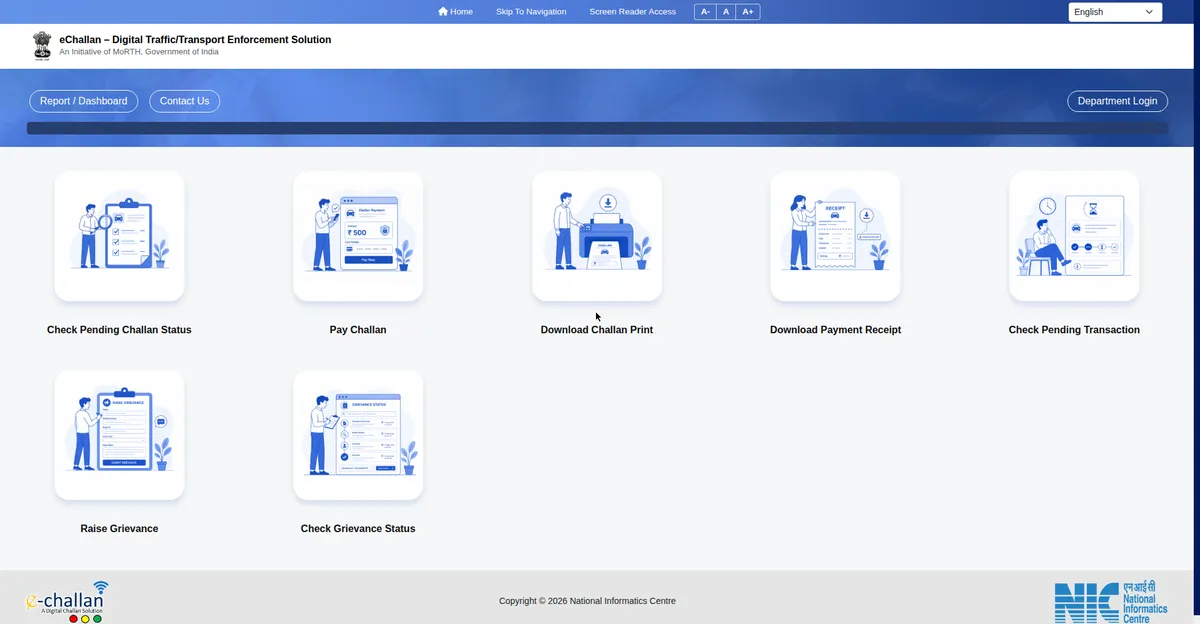
- Go to the official portal: echallan.parivahan.gov.in.
- On the homepage, click “Check Challan Status”.
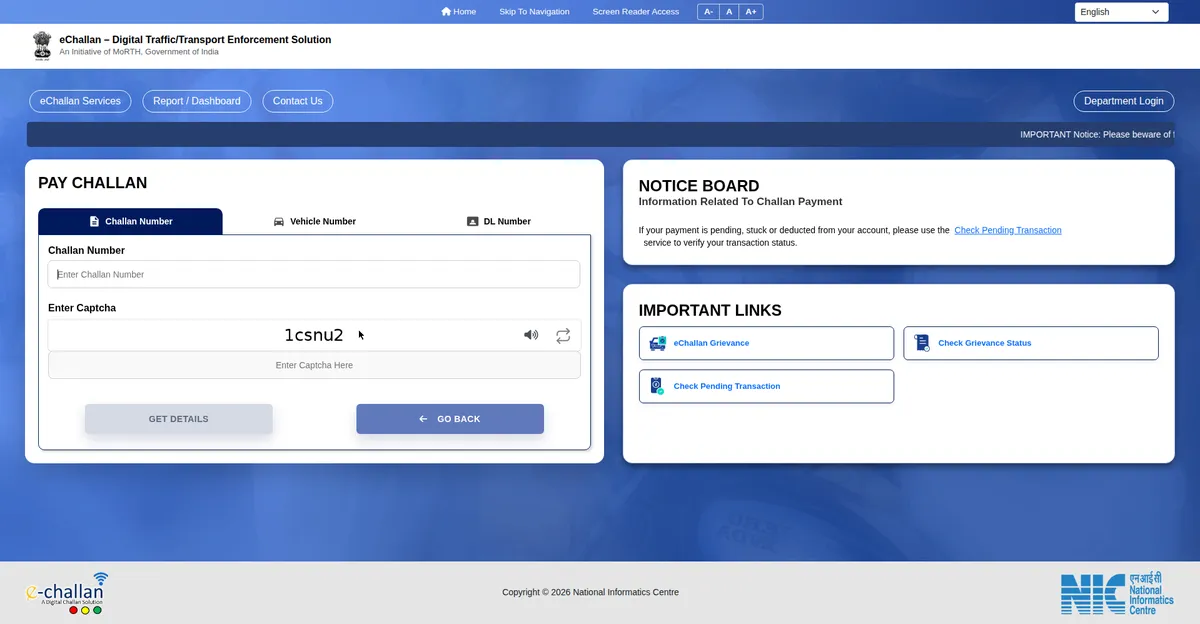
- Select the “Challan Number” tab.
- Enter your challan number (you’ll find it in the SMS sent to your registered mobile number) and the captcha code.
- Click “Get Detail” — your challan details, violation type, fine amount, and even photo evidence will appear on screen.
Method 2: Check by Vehicle Number
- Go to echallan.parivahan.gov.in and click “Check Challan Status”.
- Select the “Vehicle Number” tab.
- Enter your vehicle registration number (for example, GJ01AB1234) and the captcha.
- Click “Get Detail” to see all pending challans against your vehicle.
This is the most useful method if you’ve lost the SMS or never received one. Many people discover old pending challans this way — sometimes from months ago.
Method 3: Check by Driving Licence Number
- Open the Parivahan e-challan portal and click “Check Challan Status”.
- Select the “DL Number” tab.
- Enter your driving licence number and captcha, then click “Get Detail”.
- All challans linked to your licence will be displayed.
How to Pay E-Challan Online
Once you’ve checked your e challan status and confirmed the fine, paying it online takes just a couple of minutes. Here’s the exact process:
- After viewing your challan details (using any method above), click the “Pay Now” button next to the challan.
- You’ll be redirected to the secure payment gateway.
- Choose your payment method: UPI, debit card, credit card, or net banking — all are accepted.
- Complete the payment. You’ll receive a digital receipt instantly — save it or take a screenshot.
- The challan status will update to “Paid” on the portal within a few hours.
Pay E-Challan via Paytm or PhonePe
Don’t want to use the Parivahan website? You can also pay through popular apps:
- Paytm: Open the app → search “Challan” → select your traffic authority → enter challan/vehicle number → pay.
- PhonePe: Go to the “Recharge & Pay Bills” section → look for challan payment → enter details → pay via UPI.
Just make sure you’re paying against the correct challan number, and always keep the payment receipt until the portal reflects the paid status.
How to Pay E-Challan Offline
Prefer paying in person? You have two offline options:
- Visit the nearest traffic police station with your challan number or vehicle details. The officer will verify and collect the fine, giving you a physical receipt.
- Pay on the spot if a traffic officer stops you — they carry handheld e-challan devices and can accept payment immediately.
Offline payment makes sense if you’re not comfortable with online transactions, but honestly, the online method is faster and gives you an instant digital record.
How to Dispute a Wrong E-Challan
This is the section most guides skip — but it matters. Wrong challans happen more often than you’d think: number plate misreads by cameras, challans issued for vehicles you sold years ago, or fines for violations you never committed. Here’s exactly what to do:
- Don’t ignore it. An unpaid wrong challan still shows as pending and can cause problems during vehicle transfer or at traffic checkpoints.
- Visit your nearest traffic police station with proof: your RC, driving licence, and any evidence that the challan is wrong (for example, toll receipts or GPS records showing you were elsewhere).
- File a grievance on the Parivahan portal. Go to echallan.parivahan.gov.in and look for the complaint/grievance option. Submit your challan number with an explanation.
- Approach the virtual court. Many states now route disputed challans to virtual courts (Lok Adalat for traffic). You’ll receive a notice with a hearing date — present your case, and if the challan is found incorrect, it gets cancelled with zero fees.
- Email the traffic police. Most city traffic police departments have a dedicated email for challan disputes — check your city traffic police website.
Important: If your challan is cancelled after verification, you don’t have to pay anything. But never assume a challan is wrong without checking the photo evidence on the portal first — the camera footage is usually accurate.
Traffic Fine Rates in India 2026
Fine amounts were revised under the Motor Vehicles (Amendment) Act, 2019, and these rates continue to apply in 2026. Note that some states (like Gujarat) have reduced certain fines, so always verify the exact amount shown on your challan. Here are the standard central rates:
| Traffic Violation | Fine Amount |
|---|---|
| Driving without a valid licence | ₹5,000 |
| Driving without insurance | ₹2,000 (₹4,000 for repeat offence) |
| Not wearing a helmet (two-wheeler) | ₹1,000 + licence suspension (3 months) |
| Not wearing a seatbelt | ₹1,000 |
| Drunk driving | ₹10,000 (₹15,000 for repeat offence) |
| Over-speeding | ₹1,000–₹2,000 |
| Dangerous / rash driving | ₹5,000 |
| Using mobile phone while driving | ₹5,000 |
| Jumping a red light | ₹1,000–₹5,000 |
| Driving without PUC certificate | ₹10,000 |
| Overloading | ₹20,000 + ₹2,000 per extra tonne |
| Driving without number plate / HSRP | ₹5,000 |
| Minor driving a vehicle | ₹25,000 + action against guardian/owner |
Tip: The single most expensive “avoidable” challan on this list is driving without insurance — and unlike a speeding ticket, it’s entirely in your control. More on that below.
State-Wise E-Challan Portals
The central Parivahan portal works for most states, but several states also run their own traffic challan portals. Here’s a quick reference:
| State | Portal |
|---|---|
| Delhi | Delhi Traffic Police website + Parivahan |
| Maharashtra | mahatrafficechallan.gov.in + Parivahan |
| Gujarat | Parivahan (state has reduced fine slabs) |
| Karnataka | karnatakaone.com + Parivahan |
| Tamil Nadu | Parivahan |
| Telangana | echallan.tspolice.gov.in + Parivahan |
| Uttar Pradesh | Parivahan |
| West Bengal | Parivahan |
| Rajasthan | Parivahan |
| Punjab | Parivahan |
When in doubt, always start with the central portal at echallan.parivahan.gov.in — it aggregates challans from across states.
How to Check Pending Transaction Details
Sometimes your payment goes through but the challan still shows as unpaid — usually a temporary gateway delay. Before panicking, check your pending transactions:
- Go to echallan.parivahan.gov.in and click “Check Pending Transaction” on the homepage.
- Enter your vehicle number or challan number.
- The portal will show whether your payment is still being processed or has failed.
- If the payment failed, the amount is auto-refunded to your account within 5–7 working days — you can then pay again.
- If the amount was debited but the challan still shows unpaid after 48 hours, raise a complaint through the portal’s grievance section with your transaction reference number.
Pro tip: Always pay through the official Parivahan gateway or well-known apps (Paytm, PhonePe) rather than random third-party websites claiming to clear challans — several fake sites have been reported that collect money without actually settling the challan.
What Happens If You Don’t Pay Your E-Challan?
Ignoring a challan doesn’t make it go away. Here’s what actually happens:
- Court summons: Unpaid challans are eventually forwarded to the court. You’ll receive a legal notice to appear.
- Higher penalties: Courts can impose additional fines on top of the original amount.
- Vehicle-related blocks: Pending challans can hold up RC transfer, fitness certificate renewal, and re-registration.
- Traffic stops: Police checkpoints can pull up your pending challans on their devices in real time.
- Driving licence impact: Repeat violations like helmet-less riding can lead to licence suspension for 3 months.
The bottom line: check your e challan status every few months (it takes 2 minutes), and clear any dues promptly.
Smart Move: The Right Car Insurance Saves You More Than Challans
Here’s something most challan guides won’t tell you: the fine for driving without insurance (₹2,000–₹4,000) is often less than what people fear — but the real cost of being uninsured is an accident without coverage, which can run into lakhs. A good comprehensive policy protects your car, covers third-party liability, and keeps you fully compliant with the law.
If your policy is about to expire — or you’ve been driving on just third-party cover — take 2 minutes to compare plans. Comprehensive car insurance from top insurers starts at surprisingly affordable premiums, and comparing online can save you 20–30% versus renewing blindly.
Insurance protection goes beyond your vehicle too — a health insurance card under a government scheme can protect your family from lakhs in hospital bills, just like the right car policy protects you on the road.
Compare Car Insurance Plans & Save Up to 30%
Free comparison · No spam calls · Plans from 20+ insurers
Frequently Asked Questions
How can I check my e challan status without the challan number?
Use the vehicle number method on echallan.parivahan.gov.in. Select “Check Challan Status,” choose the Vehicle Number tab, enter your registration number and captcha — all pending challans will appear.
How long does it take for a paid challan to show as paid?
Usually within a few hours, but it can take up to 24–48 hours during high-traffic periods. Keep your payment receipt until the status updates.
Can I get a challan cancelled if it was issued by mistake?
Yes. Visit the nearest traffic police station with your documents, file a grievance on the Parivahan portal, or contest it in the virtual court. If verified as incorrect, the challan is cancelled with no fees.
Is there a time limit to pay an e-challan?
There’s no fixed expiry, but unpaid challans get forwarded to court after some time, which adds legal hassle and possible extra penalties. Pay within a few weeks of receiving it.
Do I need to carry physical documents if challans are digital?
Under the amended Motor Vehicles Act, digital documents on DigiLocker or mParivahan are legally valid. Traffic police must accept them — you don’t need physical copies.
Why didn’t I receive an SMS for my challan?
The SMS goes to the mobile number registered with your vehicle’s RC. If you’ve changed your number without updating the RC records, you won’t get alerts. Check your e challan status by vehicle number periodically instead.
Conclusion
Checking your e challan status online is one of the simplest government services to use — visit echallan.parivahan.gov.in, enter your vehicle number, and you’re done in 2 minutes. Pay promptly, dispute genuinely wrong challans through the proper channels, and keep your documents (especially insurance) current so you never pay a fine you could have avoided entirely.
Found this guide helpful? Share it with someone who drives — they’ll thank you the next time a surprise challan SMS lands on their phone.