Have you ever seen a product in a photo, wondered what it was called, and used your phone to find it online? That is exactly the kind of problem Google Lens helps solve, and it creates a search opportunity that many website owners overlook when planning their SEO strategy.
A shopper might photograph a handbag, scan a pair of shoes in a video, or upload a picture of a lamp they want to buy. Google Lens can return visually similar items, product information, and websites relevant to the image. Google reported in October 2024 that Lens was handling nearly 20 billion visual searches each month, with shopping-related searches accounting for 20% of that activity. Those figures are historical figures reported by Google at that time, not a verified 2026 usage count.
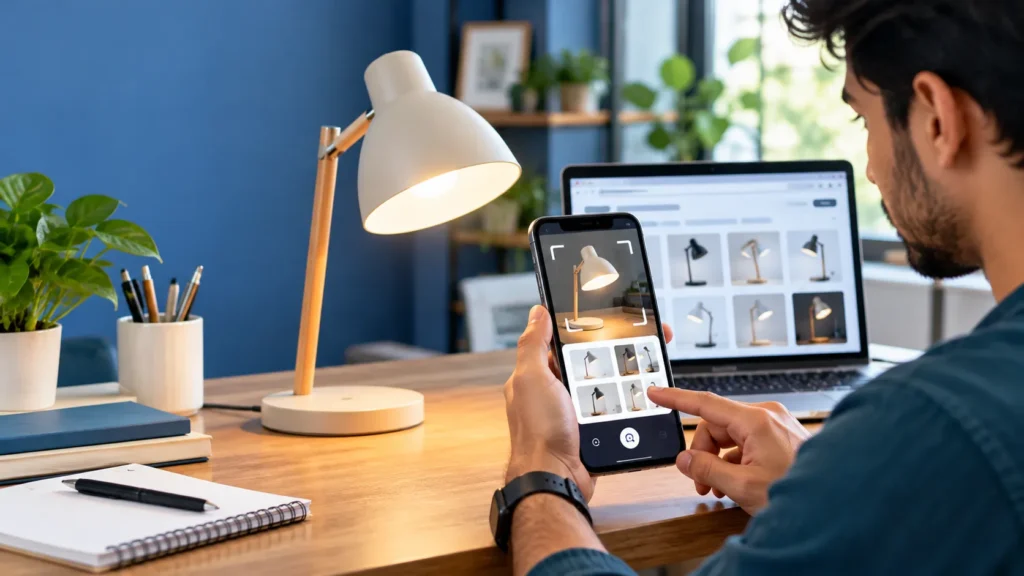
For a website owner, the opportunity is straightforward: people do not always know the correct words to type into a search box. Sometimes, they already have the image.
In this guide, I approach Google Lens SEO as a practical image-discovery and product-visibility problem. Rather than adding keywords to every image and hoping for results, the goal is to make images discoverable, give Google meaningful context, provide accurate product information, and create a useful landing page for visitors who arrive through visual search.
What Is Google Lens SEO?
Google Lens SEO is the process of improving a website’s images, surrounding content, technical accessibility, and product information so that the content has a better opportunity to be discovered through Google Lens and related visual-search experiences.
It is not a separate certification or a guaranteed ranking formula. Google publishes image SEO guidance for Google Search and specific recommendations for ecommerce products that can appear in Google Lens. Those recommendations provide the most reliable foundation for a visual-search optimization strategy.
Google Lens uses an image, a camera capture, or a screenshot as a starting point for a search. Depending on the query and available results, users may discover similar images, related websites, information about an object, or shopping options.
This changes how website owners should think about image optimization.
Traditional keyword research often begins with a phrase such as “black leather office bag.” Visual search may begin with a photograph of a bag, without the user knowing its brand, material, model, or name.
Your task is to help Google connect that visual subject with accurate information on your website.
Why Google Lens matters for SEO
Visual search can be useful for several types of websites:
- Ecommerce stores: Help shoppers discover products by their appearance, style, colour, and design.
- Affiliate websites: Publish original product photography and useful comparisons that support product discovery.
- Publishers and bloggers: Make illustrations, tutorials, diagrams, and subject-specific photographs easier to understand and discover.
- Manufacturers: Connect images of identifiable products with specifications, brand information, and relevant product pages.
- Local businesses: Publish clear, genuine photographs of products, premises, menus, and services to support visual discovery alongside their broader local SEO efforts.
These opportunities are not identical. Ecommerce sites can use product feeds and structured data, while editorial websites depend more heavily on useful visual content and relevant landing pages.
The first step is to understand which type of visual-search journey your website can serve.
How Google Lens Works From an SEO Perspective
Consider a shopper who sees a distinctive wooden table in a home-design video.
The shopper can use Google Lens to search the image. Google may identify the table’s visual characteristics, display similar furniture, or find pages with relevant images and product information. The shopper may then refine the search using words such as “round oak dining table” or “smaller four-seat version.”
Google officially supports combining image searches with additional text, allowing users to narrow their results based on their preferences.
From an SEO perspective, this creates three related requirements.
1. The image must be discoverable
Google needs to be able to crawl and process the image URL. An image that cannot be accessed, or one embedded in a way Google cannot readily process, has a technical disadvantage.
Google recommends standard HTML image elements and explains that it does not index CSS background images as it does images referenced through standard HTML image elements.
2. The image must have meaningful context
The image itself is not the only source of information. Google can use the image’s alt text, filename, captions, page content, and computer vision systems to understand what it depicts.
That means a relevant photograph on a detailed, accurate product page is more useful than an unexplained image on a page with little supporting information.
3. The website must provide a useful result
Visual similarity is only the beginning of the search journey. A shopper needs to know what the product is, what it costs, whether it is available, and whether it suits their requirements.
An ecommerce page that answers these questions gives the visitor a meaningful next step rather than forcing them to begin another search.
The main principle: Do not optimize an image in isolation. Optimize the image, the page that contains it, and the information that helps people act on what they find.
9 Google Lens SEO Best Practices
1. Publish Clear, Original, High-Quality Images
Image quality should be the first item on your visual-search checklist.
Suppose you sell a cotton kurta. A shopper finds a similar kurta using Google Lens and wants to compare colour, embroidery, neckline, and fabric. If your product photograph is blurry, heavily edited, or cropped so tightly that the design is unclear, it becomes less useful to the shopper.
A good ecommerce image set should show the actual product clearly.
Where appropriate, include:
- A primary product image with the entire item visible.
- Front, back, and side views.
- Close-ups of distinctive details, patterns, materials, or finishes.
- Additional photographs showing scale, fit, or use.
- A genuine lifestyle photograph that puts the product into context.
For products with multiple colours or styles, use images that accurately represent each variant.
Google’s product listing guidance recommends crawlable, indexable product images that represent the marked-up content. It also recommends providing multiple high-resolution image formats and aspect ratios for product information where appropriate.
Should every image have a white background?
No. A clean, neutral background is useful for identifying an individual product, especially in a catalogue. Lifestyle photographs can help communicate appearance, setting, scale, and intended use.
A strong image collection can include both.
For a footwear store, for example, use one clear product shot alongside photographs showing the shoes from different angles. Do not rely on a single fashionable lifestyle image that hides the product details buyers need.
Practical recommendation: Prioritize clarity, accurate representation, and useful variety over decorative effects.
2. Write Descriptive Image Filenames
An image filename should describe the image before it is uploaded.
Compare these examples:
| Weak filename | Better filename |
|---|---|
IMG_4728.jpg |
mens-black-running-shoes.jpg |
photo-final-2.webp |
wooden-wall-shelf-oak.webp |
product001.png |
blue-cotton-kurta-front-view.png |
image-new.jpg |
minimalist-desk-lamp-black.jpg |
A descriptive filename gives Google a small amount of additional context about the image. Google’s own guidance makes clear that filenames provide only light clues, so this should not be treated as a shortcut to rankings.
Use short, understandable filenames with hyphens between words. Avoid adding every possible variation of your target keyword to the filename.
For example, mens-black-running-shoes-side-view.jpg is clearer than best-cheap-running-shoes-for-men-black-running-shoes-buy-online.jpg.
A filename should explain the image, not serve as an advertisement.
What about existing images?
Do not automatically rename every image on a site that already receives traffic. Changing an image URL can create broken references or disrupt existing image visibility.
For existing assets, prioritize important product and editorial images first. If you change URLs, maintain working references and handle redirects where appropriate.
3. Write Accurate, Helpful Alt Text
Alt text is one of the most important elements of image optimization because it serves accessibility as well as search understanding.
Google uses alt text alongside computer vision and page content to understand the subject of an image. Its guidance specifically advises against keyword stuffing.
Here is the right way to approach it.
Poor alt text:
“best running shoes, running shoes for men, cheap shoes online, branded running shoes India”
Better alt text:
“Black men’s running shoes with white midsoles viewed from the side.”
The second description tells a reader what is actually visible. It also supplies useful contextual information without repeating unrelated keywords.
For a blog article about indoor plants, an appropriate alt description might be:
“Snake plant in a terracotta pot beside a bright living-room window.”
For a jewellery product page:
“Gold-tone hoop earrings with a smooth polished finish.”
These descriptions are specific to the actual images.
Should you put “Google Lens SEO” in every alt attribute?
No. An image of a leather handbag should not receive alt text about Google Lens SEO merely because this article targets that phrase.
Alt text should reflect what the image represents. Add a target keyword only when it accurately describes the visual content and makes sense in context.
For decorative images that add no information, an empty alt attribute may be appropriate. Images containing complex information may need more complete explanations in the accompanying page content.
4. Place Images Beside Relevant, Useful Text
A photograph of a product should appear on a page that explains that product.
A photograph of a houseplant should appear near content about the plant, not on an unrelated generic page.
Google states that the content of the page, captions, and image titles can help its systems interpret an image’s subject. It recommends placing images near relevant text and on pages relevant to the image’s subject matter.
For ecommerce, that might mean placing a clear product image beside:
- Product name and brand.
- Material or composition.
- Dimensions and available sizes.
- Colour and variant details.
- Price and availability.
- Shipping and returns information.
- Genuine product specifications.
For editorial content, provide an explanatory paragraph, a useful caption when appropriate, and enough surrounding material to explain what the image demonstrates.
This is where the content strategy becomes important. A product photograph does not need hundreds of words of unrelated prose. It needs relevant information that genuinely helps users understand the item.
When I approach a visual-search audit, I start by asking a simple question: if someone arrived here after finding the image first, would the page answer their next question?
If the answer is no, improving the filename alone is unlikely to address the real problem.
5. Use Product Structured Data Correctly
For online stores, structured data is one of the most important technical areas to review.
Google supports product structured data that can help product information appear in richer ways across Search, Google Images, and Google Lens. Depending on the page and eligibility, information can include price, availability, reviews, and shipping details.
The relevant Schema.org types commonly include Product and Offer.
A product page may communicate information such as:
- Product name and brand.
- Main product image.
- Product identifiers where available.
- Current price and currency.
- Availability.
- Product variants.
- Eligible review information.
For example, a store selling a stainless-steel insulated bottle should use product data that accurately describes that bottle, rather than generic structured data shared by every product on the site.
The image URL in the markup must be crawlable and should represent the actual marked-up product. If the product is available in different sizes or colours, review Google’s product-variant guidance to see whether ProductGroup and variant-related properties are appropriate.
Product snippets versus merchant listings
Google distinguishes product snippets, which can be appropriate for product reviews or product information pages, from merchant listings designed for products that shoppers can purchase directly.
Choose the correct structured-data implementation for your page. Adding markup does not guarantee that Google will display a rich result or surface the product in Lens.
Use the official documentation and validate the implementation with Google’s relevant testing tools before deploying it across a large catalogue.
6. Set Up Google Merchant Center for Ecommerce
This is a step that many generic image SEO guides leave out.
Google’s ecommerce documentation specifically advises merchants who want products to be found through Google Lens to upload their product details to Google Merchant Center, opt in to product listings, and follow Google’s image SEO best practices.
Merchant Center helps Google understand the products a merchant offers and the relevant information associated with those products.
Depending on your business and the listing programme, this can involve providing a product feed containing attributes such as:
- Product ID or SKU.
- Title and description.
- Brand and identifiers, where applicable.
- Product URL.
- Image URL.
- Price and currency.
- Availability.
- Condition and variant attributes where relevant.
The exact attributes and eligibility rules depend on the product category and listing programme.
Example: Optimizing a fashion store
Imagine an online store that sells women’s handbags.
A weak implementation might contain a single image, a title such as “Stylish Bag,” an outdated price, and a feed that has not been maintained.
A better implementation would use an accurate title, multiple clear product photographs, matching product-page and feed information, correct prices and availability, and appropriate product structured data.
If the store sells different colours or sizes, those variants should be represented accurately.
None of these steps guarantees a Lens appearance. They do, however, help ensure that the relevant product information is available to Google’s commerce systems and consistent with the landing page.
7. Improve Image Accessibility, Crawling, and Page Speed
Visual quality will not help if Google cannot access the image.
Review how the image is embedded and served.
Google recommends standard HTML <img> elements for image discovery. Its documentation also explains how responsive images can use srcset the picture element, with a fallback image URL in the src attribute.
A practical technical checklist includes:
- Use crawlable image URLs.
- Avoid blocking important images through robots.txt or other restrictions.
- Ensure images can be accessed without requiring a login.
- Use supported image formats such as JPEG, PNG, WebP, SVG, or AVIF where appropriate.
- Use responsive image techniques for different screen sizes.
- Keep images sharp without making files unnecessarily large.
- Use an image sitemap when it can help Google discover images that may otherwise be difficult to find.
- Check that the page and image return the correct HTTP responses.
Google notes that CSS background images are not indexed as ordinary image content in the same way as standard HTML image elements. For important product photography or editorial images, prefer an appropriate HTML image implementation.
Does a faster page improve Google Lens rankings directly?
Do not make that promise. Performance work is important for usability and page experience, but an optimized image file does not independently guarantee placement in Google Lens.
The objective is to serve clear images efficiently while maintaining a technically accessible page.
For sites with thousands of product images, automate image compression, responsive delivery, filename conventions, and image sitemap maintenance where appropriate. That is more reliable than fixing image problems manually one page at a time.
8. Match Product Data Across Your Website and Feed
Accurate information matters after visual discovery, particularly when a visitor is considering a purchase.
Imagine that Google surfaces your red backpack image, but the landing page displays a blue backpack. The price differs from the feed, or the product is no longer available.
This mismatch creates unnecessary friction.
Keep these elements aligned:
| Element | What to verify |
|---|---|
| Product image | Shows the actual product and variant |
| Product title | Identifies the correct model, type, and meaningful distinguishing features |
| Price | Matches the currently offered price |
| Availability | Reflects the product’s actual status |
| Variant | Opens the correct size, colour, or version |
| Landing page | Contains useful product information and a clear next action |
| Structured data | Describes the same item and offer as the visible page |
Google can use multiple sources of product information, and its systems may verify product data. Accuracy and consistency help prevent avoidable problems in product discovery and shopping experiences.
If a product’s price or availability changes frequently, review the process that updates your product feed and structured data. Google also warns that JavaScript-generated product structured data can make shopping crawls less frequent and less reliable in some situations. For fast-changing product information, making accurate product data available in the initial HTML is worth considering.
9. Measure Visual Search Performance With Google Search Console
An SEO strategy should be measured rather than judged by whether one product appears when you test Google Lens on your own phone.
Google Search Console has become particularly useful here because its Performance report distinguishes between different search types.
Google’s current Search Console documentation identifies Web: multimodal as a search type that includes searches originating from Google Lens, Circle to Search on Android, uploaded images, and Chrome image search. The separate Image search type measures traffic from results in the Google Images tab.
That distinction matters.
If you only examine the Image search filter, you may miss the broader multimodal search activity relevant to your visual-search strategy.
A practical measurement process
Start in Google Search Console.
- Open the Performance report for your verified website property.
- Find the search-type filter.
- Select Web and examine the multimodal search type where available.
- Review clicks, impressions, click-through rate, and available query or page data.
- Compare time periods to identify meaningful changes.
- Inspect important landing pages and test whether their images, content, and product information are current.
Also examine Image search performance separately. It can help reveal whether your images are receiving more visibility in Google Images, even though that report does not measure the same search type as multimodal visual search.
For ecommerce sites, use Merchant Center diagnostics and structured-data testing to identify feed issues and product markup errors.
Do not promise that every visual-search interaction will be attributable to a separate, perfectly labelled Google Lens channel in every analytics report. Reporting availability and attribution can vary. Use the available Search Console data together with your own landing-page and conversion metrics.
Google Lens SEO vs. Traditional Image SEO
These two disciplines overlap substantially, but their practical emphasis can differ.
| Area | Traditional image SEO | Google Lens SEO strategy |
|---|---|---|
| Main objective | Improve image discoverability in Google Search and Google Images | Improve the opportunity for visual queries to discover relevant images, products, and pages |
| Image selection | Relevant, high-quality images | Clear, representative images that support visual identification and comparison |
| Alt text | Describe the image accurately | Describe the image accurately and provide meaningful context |
| Page content | Relevant text and useful page structure | Relevant text, complete product information, and a useful next step after visual discovery |
| Technical SEO | Crawlable image URLs, supported formats, sitemaps where useful | The same technical fundamentals |
| Product data | Useful for eligible product-rich results | Particularly relevant to ecommerce visibility in Lens |
| Merchant Center | Useful for eligible commerce listings | Explicitly recommended by Google for products merchants want found in Lens |
| Measurement | Google Images performance and other search metrics | Include the multimodal search type in Search Console, where available |
Google Lens SEO should therefore be treated as an extension of a sound image SEO strategy, with added attention to the visual discovery journey and, for merchants, product feeds and product structured data.
A Practical Google Lens SEO Workflow for Different Websites
Not every website needs every tactic. The priorities depend on what you publish and what a user expects to do after finding your content visually.
For ecommerce websites
Begin with your most important product pages.
Check that each page has a unique, descriptive product title, clear product photographs, accurate alt text, current price and availability information, and the appropriate structured data.
Then review Merchant Center, verify product listing eligibility, and resolve discrepancies between the feed and landing pages.
Start with the products that matter most commercially instead of attempting a complete catalogue overhaul immediately.
For bloggers and affiliate publishers
Prioritize original visuals and content that explains what users are seeing.
If you publish a product comparison, do not fill the page with generic stock imagery and short descriptions copied from retailers. Include relevant product photographs that you are permitted to use, explain key differences, and provide accurate specifications and comparisons.
For how-to articles, use diagrams and photographs that directly illustrate each step.
A useful image should help readers understand the article even before they read the surrounding paragraph. The text should then provide the details that the image cannot communicate by itself.
For local businesses
Use genuine photographs of your own products, premises, menu items, services, and distinctive features.
Keep business names and other factual information accurate across your website and relevant business profiles. Local SEO and visual discovery can complement each other, but do not assume that uploading a photograph automatically produces a particular Google Lens result.
For example, a bakery can publish clear photographs of its cakes alongside product descriptions, ingredients where appropriate, sizes, prices, and collection or delivery information. A customer who sees a similar cake in a photograph has a better chance of finding the bakery’s relevant page if the visual and descriptive information is clear.
For product manufacturers
Manufacturers can benefit from publishing identifiable product photographs, useful technical specifications, model names, and compatible-product information.
For tools, electronic accessories, machine components, or replacement parts, accuracy matters especially because visually similar items may not be interchangeable.
A product page should make model numbers, dimensions, compatibility, and supported uses easy to verify rather than relying on a photograph alone.
A Hypothetical Example: Finding Weaknesses in a Product Page
Consider an online store selling minimalist desk lamps.
The product’s main image is a compressed lifestyle photograph in which the lamp is small and partly hidden behind a laptop. Its filename is final-product-01.jpg, and the alt text reads “best lamp online.” The product page provides only a generic description. Its Merchant Center feed contains an old price, and the product’s structured data does not accurately match the visible offer.
This is not a measured client case study; it is an illustrative audit scenario.
The recommended corrections are straightforward:
- Create a clear photograph in which the lamp is the main subject.
- Add additional views showing the shade, base, controls, and available finishes.
- Rename the important images descriptively.
- Replace the alt text with descriptions of the actual images.
- Improve the product copy with accurate dimensions, materials, lighting specifications, and use cases.
- Correct the feed, price, and availability.
- Validate the Product and Offer structured data.
- Check image accessibility and mobile page speed.
- Monitor Search Console and Merchant Center after publishing the changes.
The important lesson is that visual discovery involves more than one image attribute. A stronger page combines a recognizable product image with accurate information and a technically accessible destination.
There is no defensible basis for assigning a specific traffic-growth percentage to this hypothetical example. The effect must be measured on a real website.
Common Google Lens SEO Mistakes to Avoid
Stuffing keywords into filenames and alt attributes
Repeating “Google Lens SEO,” “visual search SEO,” and every product keyword in every image description is not a substitute for relevant metadata.
Describe the actual subject and use the terminology that accurately represents the image.
Using only stock photographs
Stock images can be appropriate for general editorial illustrations, but they often provide limited value for identifying a specific product sold by your business.
Where product authenticity matters, prioritize genuine photographs of the actual item.
Hiding important images in CSS backgrounds
Important product and editorial images should be published in a crawlable, appropriate HTML image element rather than relying exclusively on CSS backgrounds.
Publishing incomplete product pages
A photograph may attract attention, but a product page that lacks pricing, specifications, availability, or a useful next action creates a poor experience.
Using incorrect structured data
Markup that conflicts with visible content, describes the wrong product, or uses invalid information may not be eligible for the intended search features. Test the implementation and correct errors.
Ignoring mobile usability
Visual search commonly involves smartphones. Images should remain clear at mobile sizes, the page should be easy to read, and essential product information should not be hidden behind an awkward interface.
Treating one successful Lens test as proof of rankings
Visual-search results can vary according to the image, selected region of the image, text accompanying the query, available content, and other contextual factors.
Seeing your image once does not prove that it consistently ranks for visual queries. Conversely, failing to find it with one test does not establish that the image has no search visibility.
Use systematic testing and available search performance data rather than relying on isolated searches.
A 30-Day Google Lens SEO Action Plan
A month is a reasonable period for organizing an initial audit, implementing improvements, and beginning to evaluate results. It is not a guarantee that Google will index every image or generate additional traffic within that time.
| Period | Priority | Actions |
|---|---|---|
| Days 1–7 | Audit | Select key pages, inspect important images, review Search Console, identify crawl and metadata issues |
| Days 8–14 | Image improvements | Publish clear images, correct filenames and alt text, improve nearby content, check responsive delivery |
| Days 15–21 | Product data | Audit Product and Offer structured data, reconcile feed information, review Merchant Center listing eligibility |
| Days 22–30 | Validation | Check crawlability, test markup, review Search Console’s multimodal and image performance, document findings |
At the end of the month, assess which changes were implemented successfully and which metrics changed.
If impressions rise but clicks do not, look at the queries, landing pages, and available snippets before assuming that images are the problem. If the product feed reports errors, resolve those issues before continuing with more decorative image work.
A disciplined process makes it easier to identify the changes that are worth expanding across the rest of the website.
Google Lens SEO Checklist
Before publishing an important product or editorial page, check the following items.
-
The main image clearly represents the actual subject.
-
Important images use crawlable HTML image elements.
-
Filenames are short and descriptive.
-
Alt text accurately describes the image.
-
Nearby page content explains the image’s subject.
-
Images are appropriately sized and responsive.
-
Important image URLs are accessible to Google.
-
An image sitemap is available where it adds value.
-
Product pages contain accurate, complete information.
-
Product structured data matches the visible page.
-
Merchant Center product data is accurate and current, where applicable.
-
Search Console is being used to track relevant multimodal and image performance.
The priority is not to complete as many SEO tasks as possible. It is to remove the obstacles that prevent your most useful visual content from being understood and discovered.
Frequently Asked Questions About Google Lens SEO
1. What is Google Lens SEO?
Google Lens SEO means improving a website’s images, contextual content, technical accessibility, and product information to support discovery through Google Lens and related visual-search experiences. It builds on image SEO fundamentals rather than relying on a separate secret ranking formula.
2. How do I optimize my website for Google Lens?
Start with clear, relevant images. Use descriptive filenames and accurate alt text, place images near relevant page content, make image URLs accessible to Google, and ensure the landing page provides useful information. For ecommerce sites, add appropriate product structured data and review Merchant Center product listings.
3. Does Google Lens use alt text?
Google states that it uses alt text alongside computer vision algorithms and page content to understand images. Alt text should describe the actual image, provide useful context, and avoid keyword stuffing.
4. Is Google Lens SEO different from image SEO?
They overlap substantially. Traditional image SEO helps Google discover, index, and understand images. Google Lens optimization adds a strong focus on visual queries, the user’s follow-up needs, and accurate product information for merchants.
5. Does Google Lens SEO require schema markup?
Not every image on every website needs product structured data. For ecommerce pages, appropriate Product and Offer markup can help Google understand the products and make them eligible for certain richer search experiences. The markup must follow Google’s requirements and accurately represent the page.
6. Should ecommerce stores use Google Merchant Center?
Yes, merchants who want their products to be found in Google Lens should follow Google’s explicit guidance to upload product details to Merchant Center, opt in to product listings, and follow image SEO best practices. Listing eligibility and actual appearance are not guaranteed.
7. Does Google Lens SEO work for blogs?
Yes, image SEO improvements can help educational, editorial, and how-to content become more discoverable. Bloggers should publish relevant images, descriptive alt text, useful explanations, and technically accessible image URLs. Merchant Center is primarily relevant when the website is acting as a product merchant.
8. Can Google Lens identify products from a photograph?
Google Lens can return visually similar products, product information, and websites related to objects in a photograph. The results depend on the image and available information, so a visual match should not be treated as definitive proof of a product’s exact identity.
9. How can I track Google Lens SEO performance?
Use Google Search Console’s Performance report and examine the Web multimodal search type where available. Google identifies this search type as including queries originating from Lens, Circle to Search, uploaded images, and Chrome image search. Review the separate Image search type as well, but do not confuse the two metrics.
10. Does image file naming improve Google Lens rankings?
Descriptive filenames provide useful clues about an image’s subject, but Google characterizes their contribution as light. Filenames should support, not replace, good image quality, contextual page content, accessible image URLs, and accurate product information.
11. Can I use AI-generated images for Google Lens SEO?
AI-generated illustrations can be appropriate for conceptual or editorial content. For ecommerce listings, product images must accurately represent the item being offered. A decorative generated image should not misrepresent a product’s actual colour, design, specifications, or condition.
12. How long does Google Lens SEO take to work?
There is no fixed timeline. Google needs to discover and process content, and visual-search results vary. Monitor crawling, indexing, product-feed eligibility, and Search Console performance over time instead of expecting immediate traffic gains after changing image metadata.
Final Thoughts
Google Lens makes it possible to start a search with an image rather than a perfectly worded query. For website owners, that makes useful images, accurate product information, relevant page content, and technical accessibility important parts of a broader search strategy.
The most effective approach is to begin with what you already publish. Identify the product pages or articles where visual discovery would be valuable, inspect their important images, correct missing or inaccurate information, and ensure that Google can access the images.
For ecommerce, take the additional steps of validating product structured data, maintaining an accurate Merchant Center feed, and monitoring product eligibility. For blogs and publishers, prioritize original visual content, meaningful explanations, accessibility, and image discoverability.
Do not expect an alt-text change or a renamed file to produce a ranking boost by itself. Focus on the whole experience: a clear image, an informative page, trustworthy data, and a useful next step for the person who finds it. For a practical walkthrough, don’t skip our 15 Best Free SEO Tools tutorial. Our readers also found the No Backlinks SEO guide very useful.