
Have you opened the PM-KISAN portal expecting your payment status to be clear, only to find that your eKYC is still showing “No”? Or are you trying to complete PM Kisan eKYC online but are not sure whether you should use OTP, face authentication, or a CSC centre?
✅ This guide is based on official government sources and notifications. Last verified: October 12, 2026. Scheme details, eligibility criteria, and benefit amounts are revised by the government from time to time — always cross-check the latest information on the official portal before applying.
I’d start with one simple check: don’t assume that eKYC is the only condition for receiving PM-KISAN money. eKYC is mandatory for registered PM-KISAN farmers, but payment can also depend on other records and validations, including land details and Aadhaar-seeded banking arrangements. The government currently lists eKYC as mandatory and provides multiple ways to complete it.
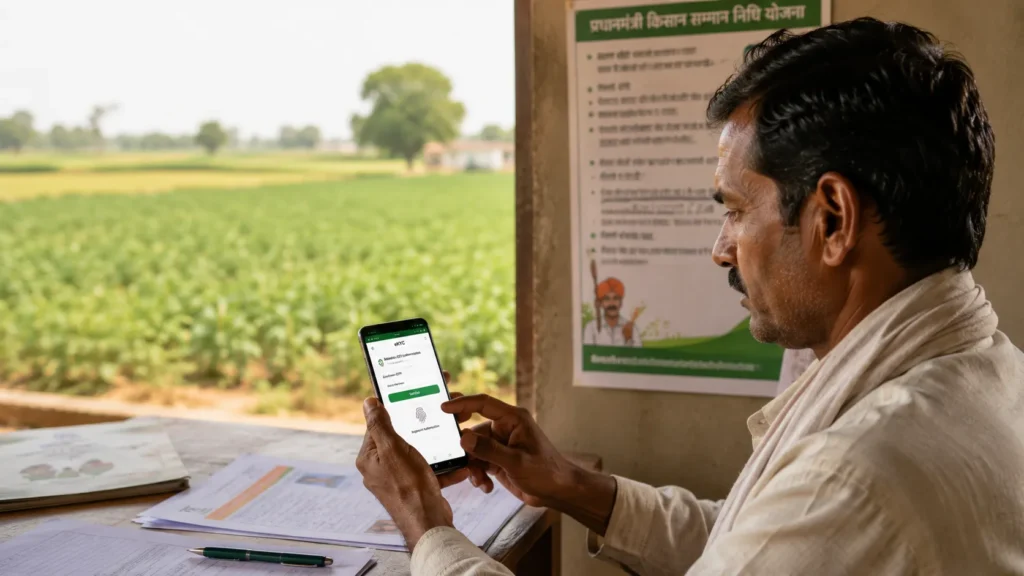
That distinction matters because it explains one of the most common situations farmers face: “My PM Kisan eKYC is complete, but my installment has not arrived.”
In this guide, I’ll walk through the entire process, from completing PM Kisan eKYC online to checking the eKYC status, understanding OTP and face authentication, dealing with Aadhaar/mobile problems, and knowing when a CSC or government office is the better option.
What Is PM Kisan eKYC?
PM Kisan eKYC is the electronic Know Your Customer verification used to confirm the identity of a registered beneficiary under the Pradhan Mantri Kisan Samman Nidhi (PM-KISAN) scheme.
The purpose is not simply to collect Aadhaar information. The verification process helps the PM-KISAN system establish that the beneficiary associated with the scheme records is the person being authenticated.
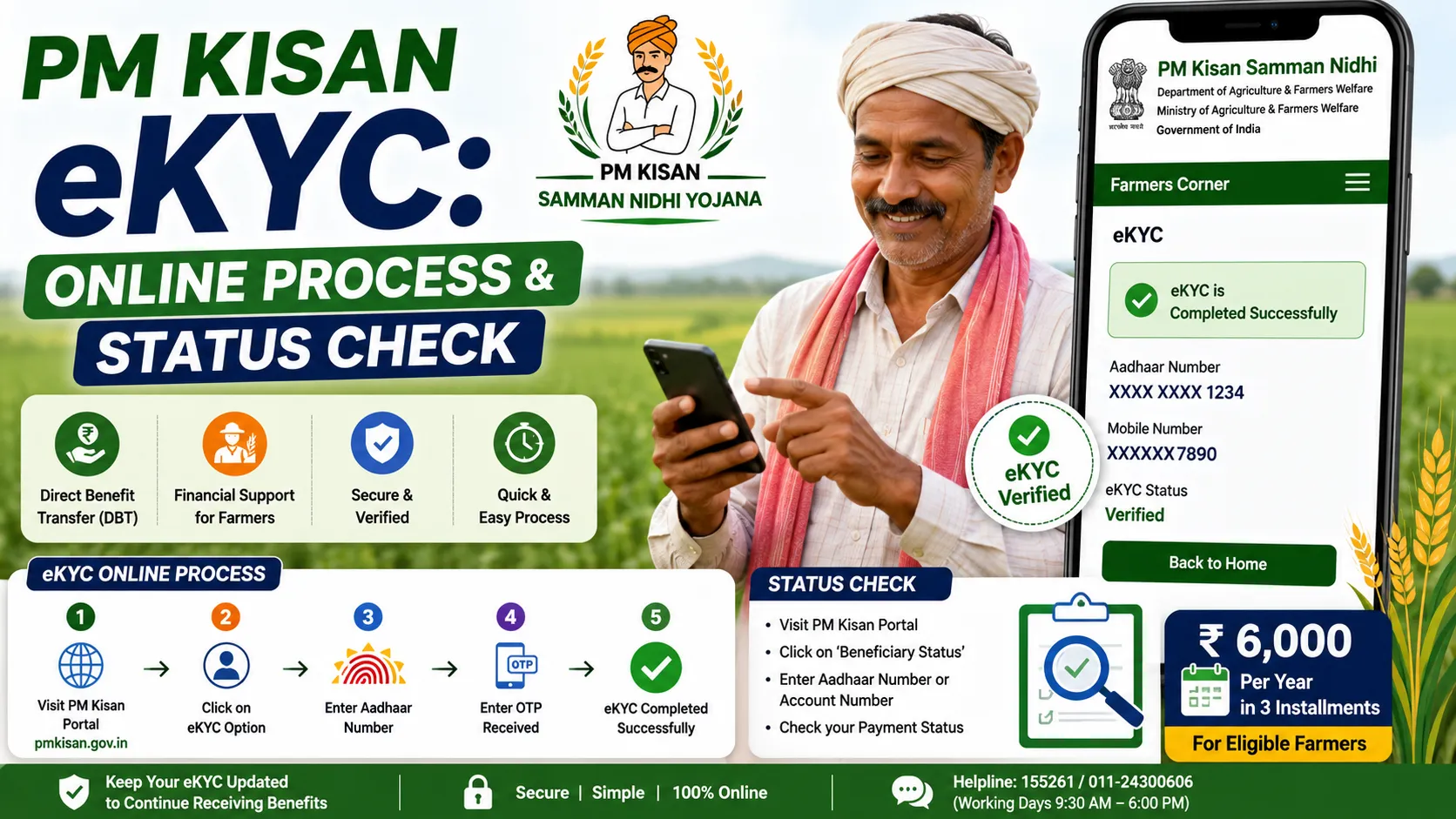
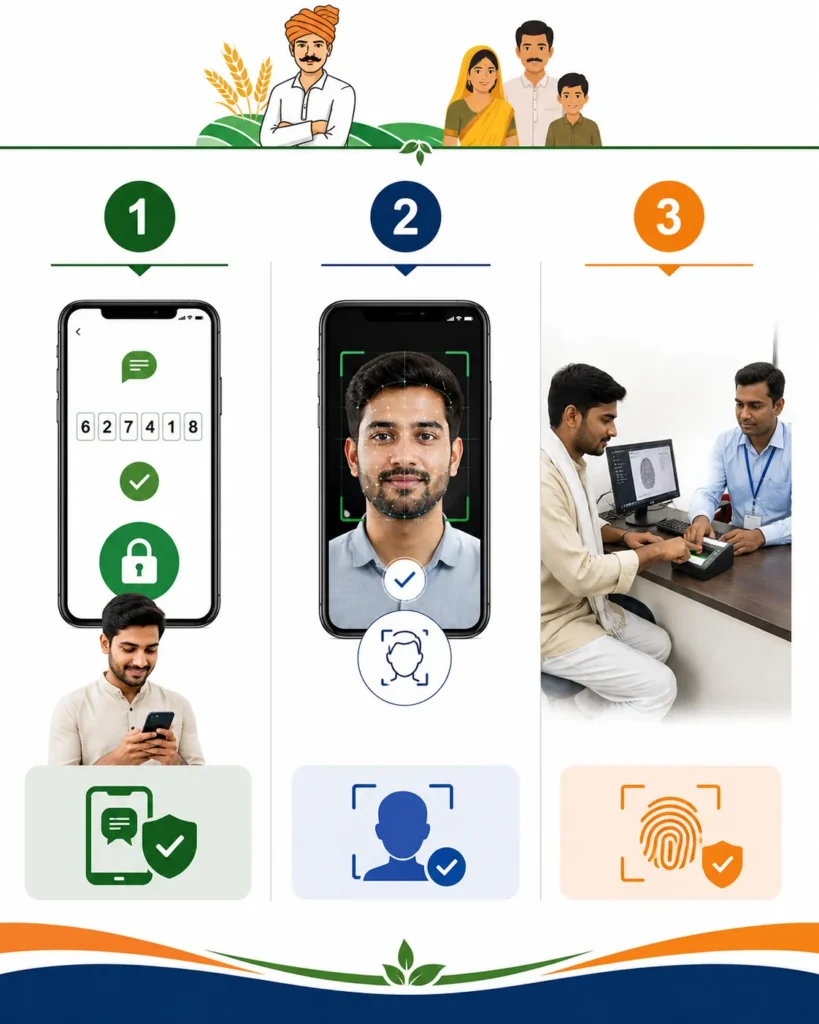
According to the Department of Agriculture and Farmers Welfare, PM-KISAN provides three eKYC modes:
- OTP-based eKYC
- Biometric-based eKYC
- Face authentication-based eKYC
This is an important improvement over a system where farmers would have only one route to complete verification.
For example, I would normally try the OTP route first when the Aadhaar-linked mobile number is active. If that does not work, I would consider face authentication through the official PM-KISAN mobile app. If digital verification continues to fail, a nearby CSC or State Seva Kendra can be the practical alternative.
Is PM Kisan eKYC Mandatory?
Yes. PM-KISAN currently states that eKYC is mandatory for registered PM-KISAN farmers.
That does not mean every farmer has to visit a government office.
The official PM-KISAN information describes online/mobile and assisted verification methods, including OTP, biometric authentication, and face authentication.
This is why it is useful to think of eKYC as a verification requirement with multiple access methods, rather than as a single online form.
Why PM Kisan eKYC Matters for Your Installment
PM-KISAN is a central sector scheme launched in 2019. Eligible farmer families receive ₹6,000 per year, normally paid in three equal installments of ₹2,000 through Direct Benefit Transfer.
The important part is where that money goes and what conditions surround the payment.
Official government information says PM-KISAN benefits are associated with:
- land details being seeded in the PM-KISAN portal,
- the bank account being Aadhaar-seeded,
- and completion of eKYC.
So I would not use this shortcut:
eKYC complete = installment guaranteed
A better way to understand it is:
eKYC complete = one important beneficiary verification requirement is satisfied.
Other eligibility, land-record, bank-account, and scheme-level validations can still affect payment.
That is also why the current PM-KISAN portal provides a Know Your Status (KYS) facility showing payment-related information such as payment status, bank name, UTR number, payment mode, and credit date.
PM Kisan eKYC Online: How to Complete It by OTP
For many farmers, OTP-based eKYC is the most straightforward route.
The official PM-KISAN eKYC document says the farmer needs an active mobile number linked with Aadhaar for OTP-based verification. The process is performed through the PM-KISAN portal or mobile application.
Step-by-step PM Kisan OTP eKYC
Step 1: Open the official PM-KISAN website
Go to the official PM-KISAN portal:
Avoid unofficial websites that ask you for additional personal information or claim they can “unlock” a PM-KISAN payment.
The official portal is maintained by the Department of Agriculture and Farmers Welfare and hosted through the National Informatics Centre.
Step 2: Select eKYC
Look for the eKYC option on the PM-KISAN website.
The official PM-KISAN documentation specifically describes clicking the eKYC option and entering the Aadhaar number for OTP-based authentication.
Step 3: Enter your Aadhaar number
Enter the Aadhaar number associated with your PM-KISAN registration.
Be careful while entering it. A simple digit error can stop the authentication process.
Step 4: Request the OTP
The system uses Aadhaar-based authentication.
Your active Aadhaar-linked mobile number is therefore important for OTP verification.
Step 5: Enter the OTP
Enter the OTP in the required field and submit the verification.
If authentication succeeds, the eKYC process is completed.
Step 6: Check the result
Do not immediately assume that every PM-KISAN page will update at the same moment.
The official PM-KISAN documentation notes that eKYC status can take time to reflect in the beneficiary status system; the published process note says the status may be reflected after 24 hours.
So if you have just completed eKYC and still see an old status immediately afterward, I would avoid repeating the process unnecessarily.
PM Kisan eKYC Through Face Authentication
This is one of the most useful options for farmers who have trouble with traditional OTP-based authentication.
The PM-KISAN mobile application supports face authentication-based eKYC, allowing farmers to complete identity verification using facial authentication rather than relying solely on an OTP or fingerprint at a CSC. Government information says the PM-KISAN app was enhanced with the face authentication feature in 2023.
The official PM-KISAN process note describes using:
- the PM-KISAN mobile app, and
- the Aadhaar Face RD application
for face-authentication eKYC.
How PM Kisan face eKYC works
The official process is broadly:
- Download the PM-KISAN mobile application.
- Install the required Aadhaar Face RD application.
- Sign in using the PM-KISAN registered mobile number.
- Open the beneficiary status area.
- If eKYC is shown as No, select eKYC.
- Enter the Aadhaar number.
- Give consent for face scanning.
- Complete the facial scan.
- Check the updated eKYC status later.
The government has specifically described face authentication as a way to enable remote farmers to perform eKYC without OTP or fingerprint authentication.
PM Kisan Biometric eKYC Through CSC
Not everyone has a reliable smartphone, an active Aadhaar-linked mobile number, or a successful face scan.
That is where the Common Service Centre (CSC) route becomes useful.
The official PM-KISAN process documentation says biometric eKYC is available through CSCs and State Seva Kendras (SSKs).
What to take to a CSC
I would generally carry:
- Aadhaar card or Aadhaar details
- The mobile number associated with your Aadhaar/PM-KISAN records
- PM-KISAN registration details, if available
- Any relevant bank account information if there is also a payment issue
The CSC operator can assist with Aadhaar-based biometric authentication.
The PM-KISAN documentation has stated a ₹15 convenience fee for eKYC at CSC/SSK facilities in its published eKYC process note. Because charges and local service practices can change, verify the applicable amount at the centre before paying.
PM Kisan eKYC: OTP vs Face vs Biometric
| Method | What You Need |
|---|---|
| OTP eKYC | Aadhaar-linked active mobile number |
| Face authentication | Compatible smartphone + official apps |
| Biometric eKYC | CSC/SSK assistance + Aadhaar authentication |
The important takeaway is that there is no need to insist on one method when another official method is available.
If OTP is failing because your Aadhaar-linked mobile number is not active, repeatedly requesting new OTPs will not solve the underlying problem.
How to Check PM Kisan eKYC Status
After completing eKYC, the next question is usually:
“PM Kisan eKYC hua hai ya nahi?”
The official PM-KISAN portal provides a Know Your Status section.
The current status system allows beneficiaries to enter their registration details and access account-related information. It also includes financial-year-wise eKYC information.
What I would check
Rather than looking only for a single “eKYC Yes” field, I would check the broader beneficiary status for:
- eKYC status
- payment status
- bank details
- UTR number
- payment mode
- credit date
- any message or warning shown by the portal
That matters because a farmer can have completed eKYC but still have another unresolved issue affecting payment.
What Does PM Kisan eKYC “Yes” Mean?
If your PM-KISAN status shows that eKYC is completed, it generally means the eKYC requirement has been successfully verified.
But it does not automatically establish every other eligibility condition.
This distinction is especially important because the PM-KISAN portal currently warns about certain suspected cases where benefits can be temporarily withheld pending physical verification. Examples listed by the portal include cases involving land acquired after 1 February 2019 and cases where more than one family member is receiving benefits in a manner that falls under the scheme’s exclusion criteria.
So when I troubleshoot a PM-KISAN payment problem, I separate it into four questions:
Is the farmer registered?
Is eKYC completed?
Are the relevant land and beneficiary records valid?
Is the bank/payment setup ready for DBT?
That approach is much more useful than simply repeating eKYC.
PM Kisan eKYC Failed: What Should You Do?
A failed eKYC does not necessarily mean that the farmer is permanently rejected from PM-KISAN.
First, identify what actually failed.
Problem 1: OTP is not received
Common possibilities include:
- Aadhaar-linked mobile number is different
- Mobile number is inactive
- Temporary network or service issue
- Authentication request has not been completed
- Incorrect Aadhaar details
The PM-KISAN eKYC documentation specifically states that OTP-based authentication requires an active Aadhaar-linked mobile number.
What to do
Wait briefly and retry once.
If OTP continues to fail because the mobile number is not correctly linked to Aadhaar, using the same screen repeatedly is unlikely to fix the underlying problem.
Consider the face-authentication or CSC route instead.
Problem 2: “Aadhaar Authentication Failed”
This can happen for several reasons.
Check the Aadhaar number carefully.
If the personal information or authentication details do not match the relevant records, the verification may not proceed.
I would not immediately conclude that the PM-KISAN registration itself is invalid.
Instead:
- Recheck the Aadhaar number.
- Make sure you are using the official PM-KISAN portal/app.
- Retry later if the service appears temporarily unavailable.
- Try another approved eKYC method.
- Visit a CSC/SSK if online authentication repeatedly fails.
Problem 3: Face Authentication Is Not Working
Face-based verification depends on the phone, application, camera, and authentication environment.
Try the basics first:
- use the official PM-KISAN application;
- install/update the required Aadhaar Face RD application;
- allow camera permissions;
- stand in a well-lit area;
- keep your face clearly visible;
- remove objects that obstruct the face;
- keep the camera stable;
- follow the on-screen instructions rather than moving unnecessarily.
If the face route repeatedly fails, I would switch to biometric authentication at a CSC instead of wasting time repeating the same unsuccessful scan.
Problem 4: eKYC Is Complete, but PM Kisan Money Has Not Come
This is one of the most important questions in the entire topic.
Do not redo eKYC automatically.
The government describes PM-KISAN payment eligibility as involving more than one element, including land details, Aadhaar-seeded banking arrangements, and completed eKYC.
The current PM-KISAN portal also provides payment-status information through the Know Your Status system, including bank name, payment status, UTR number, and credit date.
A better troubleshooting sequence
First, check whether eKYC is Yes.
Then check the beneficiary status.
Then look for:
- payment status;
- bank information;
- payment mode;
- UTR number;
- any pending verification message;
- land-record or eligibility-related warning.
This tells you whether the issue is actually eKYC or something else.
Does PM Kisan eKYC Guarantee the Next Installment?
No.
eKYC is mandatory, but it should not be confused with a guarantee of payment.
PM-KISAN is an eligibility-based scheme. Landholding, beneficiary identification, exclusions, and other verification/payment conditions matter.
For example, the official PM-KISAN portal says certain suspected exclusion cases may have benefits temporarily withheld until physical verification.
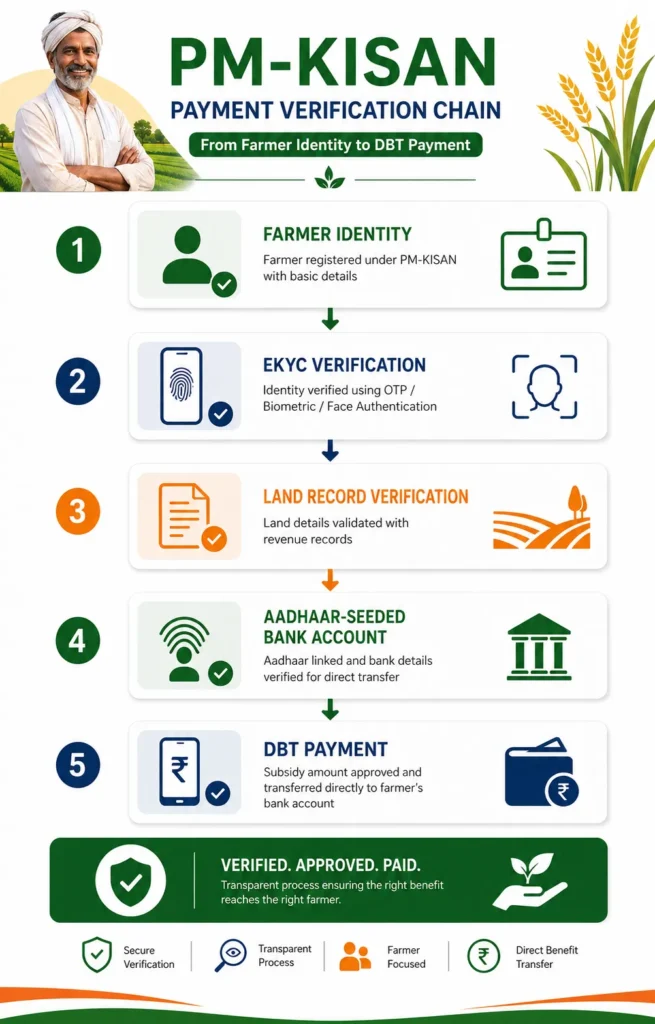
The broader payment chain can therefore be understood as:
Eligible farmer → verified beneficiary records → land information → eKYC → Aadhaar-seeded bank/payment setup → payment processing
This is why checking only the eKYC field can produce a misleading picture.
PM Kisan eKYC and Aadhaar Linking: Are They the Same Thing?
They are related, but they should not be treated as exactly the same thing.
Aadhaar authentication/eKYC verifies the beneficiary’s identity through Aadhaar-based mechanisms.
Aadhaar seeding of the bank account is related to the payment mechanism through which eligible benefits are transferred.
Government releases state that PM-KISAN assistance is transferred through DBT into Aadhaar-seeded bank accounts, and current government information says farmers need the relevant bank Aadhaar linkage and completed eKYC for benefits.
So a farmer asking:
“My Aadhaar is linked, so why is PM Kisan eKYC still pending?”
is dealing with two related but distinct parts of the beneficiary and payment system.
How Long Does PM Kisan eKYC Take to Update?
The official PM-KISAN eKYC process note states that eKYC completed through the available methods may take up to 24 hours to reflect in beneficiary status.
That gives you a practical rule:
Just completed eKYC? Give the system some time before assuming it failed.
If the status remains unchanged well beyond the stated update window, check the beneficiary status again and consider an alternate verification or grievance/support route.
Is PM Kisan eKYC Free Online?
The official PM-KISAN process documentation describes OTP-based eKYC through the portal/app and provides a stated convenience fee for biometric eKYC through CSC/SSK facilities. The published note lists ₹15 for CSC/SSK eKYC.
Because fees and local service practices can be revised, I would distinguish between:
online self-service eKYC and assisted CSC service.
Never pay a private website simply because it claims to be an “official PM-KISAN eKYC portal.”
Use the official PM-KISAN domain and recognized government service channels.
What Is the PM-KISAN Mobile App Used For?
The PM-KISAN mobile app is more than a payment-checking tool.
Government information says the app supports services including:
- self-registration,
- benefit-status tracking,
- facial authentication-based eKYC.
The government has also introduced Kisan-eMitra, an AI-enabled PM-KISAN chatbot designed to help farmers with queries related to registration, eligibility, and payments in local languages.
That creates several official digital touchpoints rather than forcing every issue into the same web form.
PM Kisan 23rd Installment and Current Status
Current PM-KISAN information is important because old articles often contain outdated installment numbers and instructions.
The official PM-KISAN website states that the 23rd installment was released on 20 June 2026 from Tarakeswar, Hooghly, West Bengal. The portal’s current data also lists 9,44,65,646 farmers under the April–July 2026-27 period.
A June 2026 PIB release likewise reported that more than ₹4.46 lakh crore had been disbursed across 23 installments.
Because installment information changes over time, I would avoid publishing a fixed “next installment date” unless it has been officially announced.
This is a small SEO point with a big trust implication: government-scheme articles need maintenance.
A Simple PM Kisan eKYC Checklist
Before you start, keep these ready:
For OTP eKYC
- Aadhaar number
- Active Aadhaar-linked mobile number
- Internet connection
- Access to the official PM-KISAN portal
For face authentication
- Smartphone
- PM-KISAN mobile app
- Required Aadhaar Face RD application
- Camera permission
- Good lighting
For CSC biometric eKYC
- Aadhaar details/card
- Mobile number
- PM-KISAN information, if available
- Access to a nearby CSC/SSK
Five Mistakes I Would Avoid During PM Kisan eKYC
1. Using a random website
Search engines can show many pages for “PM Kisan eKYC online.”
That does not make them government websites.
Use the official pmkisan.gov.in portal.
2. Sharing OTP with another person
Never give your Aadhaar or authentication OTP to someone over a phone call simply because they claim they will “complete your PM Kisan eKYC.”
3. Repeating eKYC immediately
If you have just completed the process, give the official system time to update.
The government eKYC process note specifically allows for status reflection after the process rather than promising an immediate update.
4. Assuming eKYC is the only payment condition
This is perhaps the biggest misunderstanding.
Land records, eligibility checks, Aadhaar-seeded banking, and other validations can matter.
5. Trusting old articles blindly
PM-KISAN processes, mobile-app capabilities, installment numbers, and portal interfaces can change.
Always compare older instructions with the current official PM-KISAN portal.
What To Do If Your PM Kisan Status Is Still Pending
I would follow this order:
First: Check the eKYC status.
Second: Check the beneficiary’s Know Your Status page.
Third: Read the actual message shown there.
Fourth: Check bank and payment information.
Fifth: Check whether any verification or eligibility issue is displayed.
Sixth: If eKYC itself is still incomplete, try another approved method.
Seventh: For persistent biometric or authentication problems, visit a CSC/SSK or use the appropriate official support/grievance mechanism.
This order prevents a common mistake: treating every payment problem as an eKYC problem.
PM Kisan eKYC: Quick Comparison
| Situation | Best First Action |
| Aadhaar-linked mobile works | OTP eKYC |
| OTP unavailable but smartphone available | Face authentication |
| Smartphone/app verification fails | CSC biometric eKYC |
| eKYC says Yes but payment is missing | Check Know Your Status and payment details |
| Bank/account information is incorrect | Resolve banking/payment record issue |
| Eligibility/verification warning appears | Follow the official status message and verification process |
| eKYC completed very recently | Allow time for status synchronization |
Why eKYC Is Important for PM-KISAN’s DBT System
The larger purpose of eKYC becomes clearer when you look at how PM-KISAN is designed.
The scheme uses a digital beneficiary infrastructure intended to transfer money directly rather than relying on intermediaries. Government releases describe Aadhaar-based identity verification, DBT, and Aadhaar-seeded bank accounts as significant parts of the delivery mechanism.
From the farmer’s perspective, this means the system is not just about filling out a form.
It connects several records:
Identity → beneficiary record → land record → payment account → DBT
That is also why a small mismatch can sometimes create a surprisingly large problem.
A farmer may think:
“Everything is correct on my side.”
The portal may still show a pending issue because a different database or verification layer needs attention.
Frequently Asked Questions About PM Kisan eKYC
Is PM Kisan eKYC mandatory?
Yes. The official PM-KISAN portal currently states that eKYC is mandatory for registered PM-KISAN farmers.
Can I complete PM Kisan eKYC online?
Yes. PM-KISAN officially supports OTP-based eKYC through its portal/mobile ecosystem, along with face authentication and assisted biometric options.
Can I complete PM Kisan eKYC without visiting a CSC?
Yes, provided you can successfully complete an official digital method such as OTP-based or face-authentication eKYC.
What if my Aadhaar-linked mobile number is not active?
OTP-based eKYC requires an active Aadhaar-linked mobile number. If that route is unavailable, consider the face-authentication or biometric route.
How much does CSC eKYC cost?
The PM-KISAN process note specifies a ₹15 convenience fee for eKYC at CSC/SSK facilities. Since service charges may be updated, confirm the applicable fee at the centre.
How can I check whether PM Kisan eKYC is completed?
Use the official PM-KISAN Know Your Status facility and review the eKYC information shown for your beneficiary record.
My eKYC is complete. Why is my PM Kisan payment still pending?
Because eKYC is only one part of the beneficiary/payment process. Land details, Aadhaar-seeded bank-account arrangements, eligibility, and other verification conditions can affect payment.
How long does eKYC take to show in the PM Kisan status?
The official process documentation says eKYC status may be reflected after 24 hours.
Can I use face authentication for PM Kisan eKYC?
Yes. The PM-KISAN mobile application supports face-authentication-based eKYC.
Is PM Kisan eKYC the same as linking Aadhaar to my bank account?
No. They are connected to the overall beneficiary and payment system but perform different functions. eKYC is identity verification, while Aadhaar seeding of the bank account relates to the payment mechanism.
Should I redo eKYC if my status is not updated immediately?
Not necessarily. If you completed the process recently, first allow time for the status to synchronize. The official process note says the status may take up to 24 hours to appear.
Conclusion
When someone searches for PM Kisan eKYC, they usually want one of three things: to complete eKYC, to confirm whether it is already complete, or to understand why a PM-KISAN installment is not showing up.
The practical answer is straightforward.
OTP eKYC is usually the first option when the Aadhaar-linked mobile number works.
Face authentication is useful when you want to complete verification remotely through the official PM-KISAN mobile ecosystem.
Biometric eKYC through a CSC or SSK is the sensible fallback when online verification is not working.
Most importantly, I would not stop troubleshooting at the word “eKYC.” Once eKYC is complete, check your broader PM-KISAN beneficiary status, because payment depends on more than identity verification alone. Official government information links PM-KISAN benefits with beneficiary records, land details, Aadhaar-seeded bank accounts, and completed eKYC. PM-KISAN covers income support; for protecting the standing crop itself against drought, flood or pest attack, there is a separate PM Fasal Bima Yojana crop insurance scheme.
And before entering Aadhaar details or an OTP anywhere, check the domain carefully. For PM-KISAN, the official government portal is pmkisan.gov.in.